 Tanish Manku
1155b12b32
The previous panel-undo fix used session boundaries (open on first
edit, commit on selection change / unmount). It overshot: while
editing the same object's panel without changing selection, the
session never committed, so Ctrl+Z fell through to the most recent
*previous* entry — typically the CreateAction that added the shape.
Result: editing a shape's transform then hitting Ctrl+Z deleted the
shape.

Replace session boundaries with action-level coalescing:

- Add optional `tryMerge(other)` to the UndoableAction interface.
  HistoryManager.record now offers each new action to the previous
  entry's tryMerge first; if absorbed, the new action drops out and
  the existing entry's `after` extends to cover the burst.
- TransformAction: constructor now takes (editor, uuid, before, after)
  directly; drop the begin/commit pattern. tryMerge merges a follow-up
  TransformAction whose `before` matches this one's `after` (chain
  continuity) — same uuid only.
- ColorAction: same treatment. tryMerge folds the native color
  picker's per-pixel onChange burst into a single undo entry.

Caller-side: drop all session machinery from the panel
(transformSessionRef, colorSessionRef, lastUuidRef, beginPanelTransform,
commitPanelTransform, the unmount-only effect). On every input
change the panel calls `transformObject` / `setObjectColor`, which
snapshot before, apply, snapshot after, and record. The manager
handles the rest.

Gizmo path in editor.ts updated to the new TransformAction shape:
capture before-snap at dragstart on a small `activeDragStart` ref,
build TransformAction(before, after) at dragend.

Side benefit: gizmo-drag and panel-edit bursts on the same object
now coalesce into a single undo entry across input sources, since
both produce TransformActions whose chain continues.
The IDE for artists.


ArtCraft
ArtCraft is the IDE for interactive AI image and video creation. We turn prompting into crafting, so your ideas become a form of tangible expression and computing. This is Adobe Photoshop for everyone, and we're giving away the source code!
Show, Don't Tell: Advanced Crafting Features
Text-to-image is great, but artists need control. It's important to know what your image will look like before you generate it, and it's vitally important to achieve consistency and repeatability.
| Feature | Demo + Explanation |
|---|---|
| Image to Location | |
| 3D Image Compositing | |
| 2D Image Compositing | |
| Image to 3D Mesh | |
| Character Posing | |
| Scene Blocking w/ Kit Bashing | |
| Character Identity Transfer | |
| Background Removal | |
| Mixed Asset Crafting | 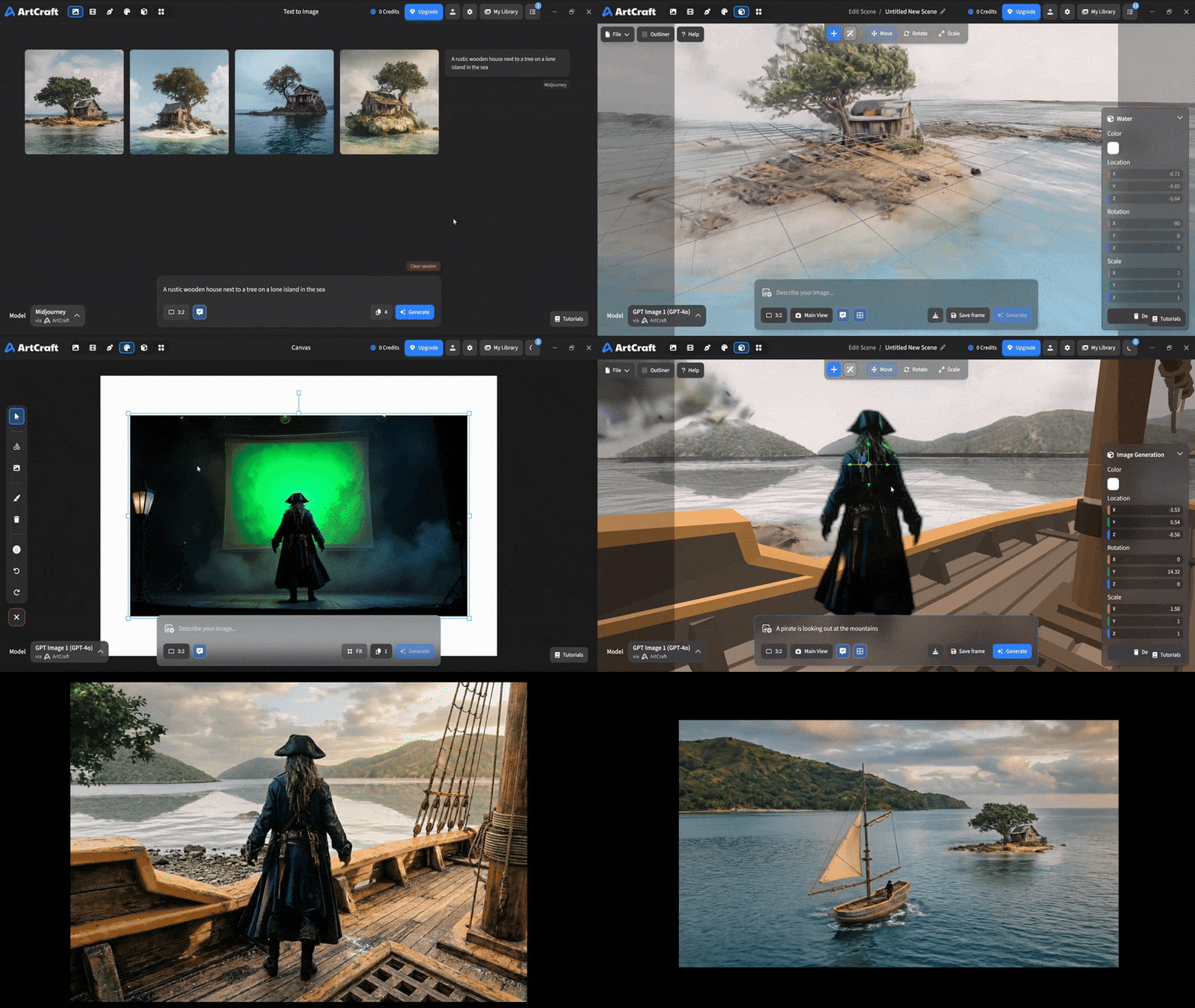 You can use image cutouts, worlds, and simple 3D meshes all together to precisely and intentionally lay out your scenes. |
| Scene Blocking | (preview coming soon) |
| Canvas Editing | (preview coming soon) |
| Scene Relighting | (preview coming soon) |
Note: all of the above videos were generated for free with Grok Video; the cost to build this README was negligible.
Quick and Easy Prompting
We haven't abandoned text-to-asset generation for quick prototyping and ideation. We support every popular workflow in a first class fashion.
| Feature | Demo + Explanation |
|---|---|
| Text to Image | |
| Image Editing | |
| Image Editing | |
| Image to Video | |
| Image Inpainting | (preview coming soon) |
| Image Ingredients | (preview coming soon) |
Models and Providers Supported within Artcraft
| Provider | Features |
|---|---|
| Artcraft | Nano Banana, Nano Banana Pro, GPT-Image-1 / 1.5, Seedance 1.0 Lite / 1.5 Pro / 2.0, Seedream 4 / 4.5, Flux 1.1 / Kontext, Veo 2 / 3 / 3.1, Kling 1.6 / 2.1 / 2.5 / 2.6, Sora 2 / Pro, Hunyuan 3d 2 / 3 |
| Grok | Grok Imagine, Grok Video |
| Midjourney | Image Gen (all versions) |
| Sora | Sora 1, Sora 2, GPT-Image-1 |
| WorldLabs | Marble (Gaussian Splat World Generation) |
We're going to be adding the following providers soon: Kling (via Kling website accounts), Google (via API keys), Runway (via website account), Luma (via website account).
We're potentially interested in adding other aggregators for those who already have subscriptions and credits at those providers, for example: OpenArt, FreePik, etc.
Downloads
- Visit our website for the stable Windows and MacOS releases
- Or you can grab a more recent Windows and MacOS build directly
- Linux requires building from source for now