
 Tanish Mankuandbflatastic
e3f48033f9
## Summary

Adds a unified, remappable keyboard-shortcut system
(`@storyteller/keybinds`) across the webapp and desktop app, replacing
the scattered hardcoded `keydown` listeners in the 3D editor, 2D editor,
and moodboard with one registry, two presets (**Gamer** = today's
defaults, **Blender-like**), a Settings → Keybinds pane, and a hold-Ctrl
/ pinnable cheatsheet on every editor surface.

This PR was approved in June and then sat behind ~195 commits on `main`
(timeline, build/record modes, lucide migration). It has been merged
with current `main` and extended to cover the features that landed
since. **Nothing changes by default** — the Gamer preset reproduces
every existing key exactly.

## Architecture

- **Registry of `ActionDef`s** keyed by surface-namespaced ids
(`pagescene.timeline.playPause`), bound to physical `event.code`.
Resolution: user override → preset delta → base bindings. Persisted in
the `artcraft-keybinds` zustand store.
- **Five surfaces**: `global`, `pagescene` (3D), `pagedraw` (2D),
`moodboard` (canvas), `moodboard-grid` (board library / inspector /
presentation).
- **Declared availability** — `ActionDef.when(ctx)` gates decide whether
a binding is live for the current editor state (`sceneMode`, `encoding`,
`timelineExpanded`, `timelineSelection`, …). An unavailable binding
falls through *without consuming the event*, which is what lets Space /
arrows / Delete / Escape be shared by context-exclusive actions. A
sampled-context checker (`actionsCoAvailable`) proves the exclusivity in
tests and drives the conflict UI in Settings.
- **Global surface is a pure trigger layer**: features register behavior
with `useGlobalAction(id, handler)`; a window capture-phase dispatcher
fires above the modal key-swallow, and an unregistered binding is inert
per host. First inhabitant: Ctrl/Cmd+B sidebar. This is the intended
home for the upcoming privacy-blur toggle (one `ActionDef` + one binding
+ one `useGlobalAction` call).
- Cross-surface conflict detection (global ↔ everything, both
directions); preset-integrity tests guard every preset against
same-surface collisions.
- **Video editor keeps its own keybinds system** — deliberate non-goal.

## What's in it

**3D editor (pagescene)**
- Timeline actions: Space play/pause, ←/→ frame step or keyframe/strip
nudge, Home/End, `I` add keyframe (Blender parity), Shift+T expand,
Delete/Backspace on a valid timeline selection (exact complement of
scene-object delete).
- Record mode: Tab toggles build/record, `C` capture still, `R` record
video (bare letters — Firefox eats Ctrl+Shift+S/E), Escape cancels an
in-flight encode (overlay Cancel button too). Record mode is immutable:
all scene-mutating actions gate off, Escape no longer drops out of the
render cam.
- **Per-edit timeline undo** — every timeline edit is one Ctrl+Z step
(`TimelineEditAction` with whole-timeline snapshots; drags and the
easing popover coalesce into single steps). Save now only moves the
Cancel baseline; Cancel is itself undoable.
- The old "Shortcuts" modal is replaced by the live cheatsheet, pinnable
from the same button.
- Dead code removed: `MouseControls.onkeydown`, `OnboardingHelper`, the
hardcoded `Help` view, three unused pagedraw hotkey hooks.

**2D editor (pagedraw)**
- Tool hotkeys 1–5 with live key badges on the toolbar icons; the shape
key cycles rectangle → circle → triangle (submenu-aware).
- Ctrl+= / Ctrl+- (and numpad) resize the active tool. The eraser now
has its own size (was sharing the brush's) and its own slider popout;
also fixes the eraser button never highlighting.

**Moodboard**
- Canvas keys unchanged (now registry-backed), plus Ctrl+0 reset
viewport.
- Grid: rate 0–5 / `P` pick / Delete / Escape, inspector and
presentation ←/→/Space/Esc — all rebindable. Escape now closes the
inspector; arrows no longer navigate while typing in the tag field.

**Settings & cheatsheet**
- Settings → Keybinds: preset picker, name/key search, per-action rebind
with conflict warnings, per-section reset, and a bottom "danger zone"
reset-all with a two-step confirm (2 s lockout + visible 5 s
auto-disarm).
- Cheatsheet: hold Ctrl (⌘) 3 s to peek; **General → "Keep shortcut
cheatsheet open"** makes it stick until Esc / click-outside; the 3D
"Shortcuts" button pins it.

## Testing

- `@storyteller/keybinds` unit tests (29): resolution layering,
overrides, per-surface/global reset, conflict detection incl.
global↔surface, matcher semantics, and preset integrity across all
presets.
- Builds green: `keybinds`, `ui-pagescene`, `ui-pagedraw`,
`ui-moodboard`, `ui-settings-modal`, `artcraft-webapp`, `artcraft`
(desktop).
- Manual QA pass completed on the webapp for every area above (settings
pane, cheatsheets, Blender modal transforms, timeline/record keys,
pagedraw toolbar, global surface, reset UX, pinned cheatsheet, timeline
undo, Escape contexts).

## Notes for review

- The keybinds store is unversioned-migration-free on purpose — the PR
was never merged, so there's no persisted shape to migrate from.
- Space-hold pan (moodboard) and held WASD camera movement stay as
gestures, resolved from the same store but outside the discrete-action
dispatch.

---------

Co-authored-by: bflatastic <bombayapirat@gmail.com>
The IDE for artists.


ArtCraft
ArtCraft is the IDE for interactive AI image and video creation. We turn prompting into crafting, so your ideas become a form of tangible expression and computing. This is Adobe Photoshop for everyone, and we're giving away the source code!
Show, Don't Tell: Advanced Crafting Features
Text-to-image is great, but artists need control. It's important to know what your image will look like before you generate it, and it's vitally important to achieve consistency and repeatability.
| Feature | Demo + Explanation |
|---|---|
| Image to Location | |
| 3D Image Compositing | |
| 2D Image Compositing | |
| Image to 3D Mesh | |
| Character Posing |  You can dynamically pose your characters to achieve the precise character, scene, and camera blocking before calling "action". |
| Scene Blocking w/ Kit Bashing | |
| Character Identity Transfer | |
| Background Removal | |
| Mixed Asset Crafting | 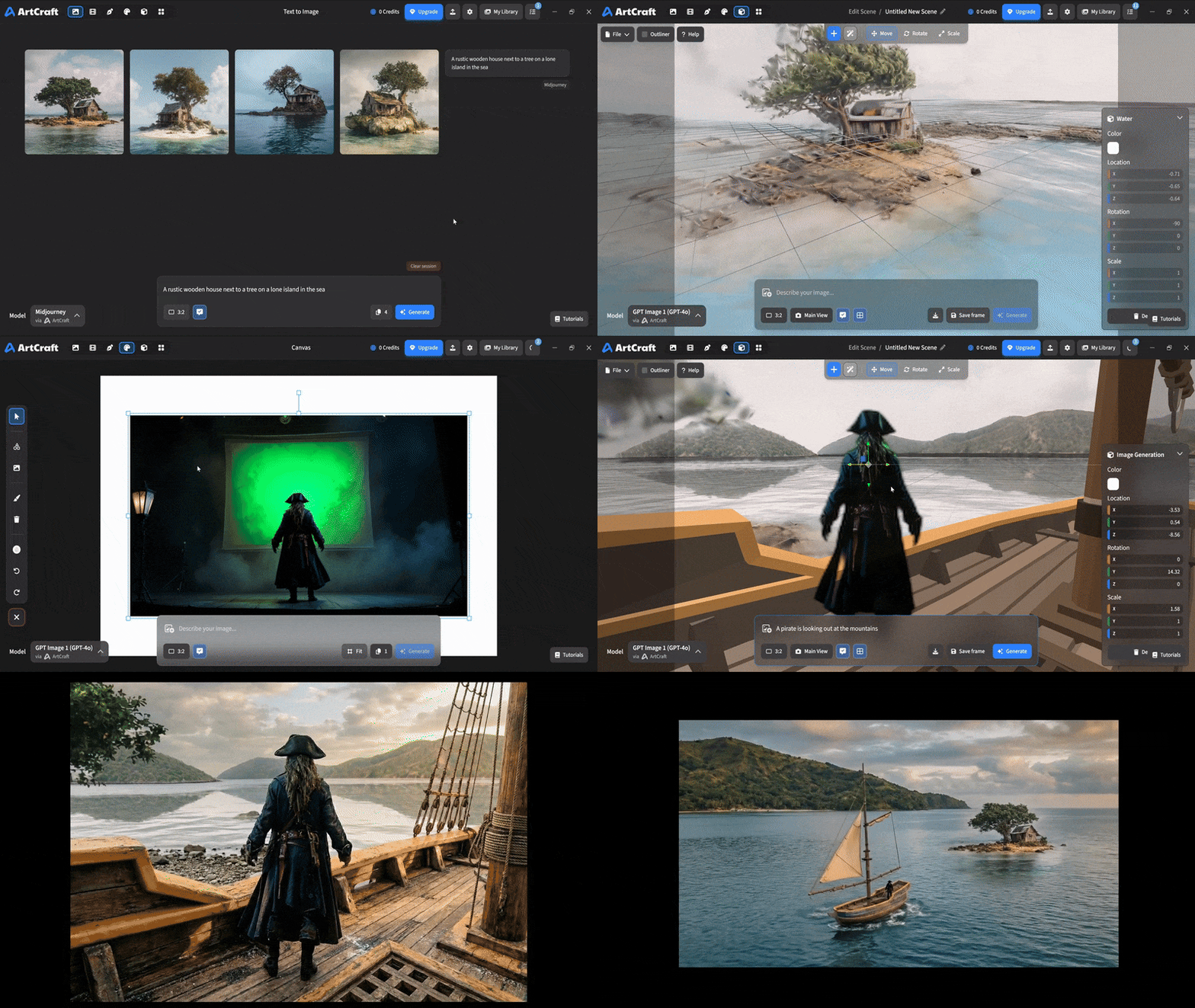 You can use image cutouts, worlds, and simple 3D meshes all together to precisely and intentionally lay out your scenes. |
| Scene Blocking | (preview coming soon) |
| Canvas Editing | (preview coming soon) |
| Scene Relighting | (preview coming soon) |
Note: all of the above videos were generated for free with Grok Video; the cost to build this README was negligible.
Quick and Easy Prompting
We haven't abandoned text-to-asset generation for quick prototyping and ideation. We support every popular workflow in a first class fashion.
| Feature | Demo + Explanation |
|---|---|
| Text to Image | |
| Image Editing | |
| Image Editing | |
| Image to Video | |
| Image Inpainting | (preview coming soon) |
| Image Ingredients | (preview coming soon) |
Models and Providers Supported within Artcraft
| Provider | Features |
|---|---|
| Artcraft | Nano Banana, Nano Banana Pro, GPT-Image-1 / 1.5, Seedance 1.0 Lite / 1.5 Pro / 2.0, Seedream 4 / 4.5, Flux 1.1 / Kontext, Veo 2 / 3 / 3.1, Kling 1.6 / 2.1 / 2.5 / 2.6, Sora 2 / Pro, Hunyuan 3d 2 / 3 |
| Grok | Grok Imagine, Grok Video |
| Midjourney | Image Gen (all versions) |
| Sora | Sora 1, Sora 2, GPT-Image-1 |
| WorldLabs | Marble (Gaussian Splat World Generation) |
We're going to be adding the following providers soon: Kling (via Kling website accounts), Google (via API keys), Runway (via website account), Luma (via website account).
We're potentially interested in adding other aggregators for those who already have subscriptions and credits at those providers, for example: OpenArt, FreePik, etc.
Downloads
- Visit our website for the stable Windows and MacOS releases
- Or you can grab a more recent Windows and MacOS build directly
- Linux requires building from source for now