 Tanish Manku
e39e67195e
stylizeTab.ts (deleted). 11 consumers migrated:

UI components:
- StyleOptions: cinematic / upscale / faceDetail / lipSync /
  enginePreProcessing toggles drive the matching store setters; the
  upscale<->cinematic mutual-exclusion logic preserved
- StyleStrength: slider + number input read styleStrength from store,
  call setStyleStrength
- Prompts: textBufferPositive / textBufferNegative now positivePrompt /
  negativePrompt on the store; isUserInputPositive /
  isUserInputNegative / showNegativePrompt as fields with setters
- IPAdapter: adapterImage + globalIPAMediaToken from store; useShallow
  subscribes to all four needed fields/setters in one selector
- StylizeTab: selectedArtStyle from store, setSelectedArtStyle replaces
  the old setArtStyleSelection helper
- StyleSelection: same pattern -- selectedArtStyle and
  setSelectedArtStyle
- GenerateMovieButton: snapshots the entire stylize bag from the store
  with usePageEnigmaStore.getState() inside the click handler

Engine + persistence:
- SceneMetadata.getSceneGenerationMetaData reads cameraAspectRatio,
  globalIPAMediaToken, upscale, faceDetail, styleStrength, lipSync,
  cinematic, enginePreProcessing all from the store in one getState()
- save_manager.loadFromJson restores all stylize state through the
  store's setters instead of the old restoreSceneGenerationMetadata
  signal helper. globalIpAdapterImageMediaToken restoration also goes
  through setGlobalIPAMediaToken
- video_generation: setGlobalIPAMediaToken on upload + reads
  globalIPAMediaToken from store for the gen request payload
- ControlsTopButtons: new-scene flow calls
  usePageEnigmaStore.getState().resetSceneGenerationMetadata()

Bonus cleanup:
- SidePanelTabs reverted to inlining pageHeight - 64 (the previous
  edit got lost in a stash round-trip)
- IPAdapter dropped useSignals and uses useShallow for its 4-field
  selector

Net effect on typecheck: 145 -> 144 errors in PageEnigma.
The IDE for artists.


ArtCraft
ArtCraft is the IDE for interactive AI image and video creation. We turn prompting into crafting, so your ideas become a form of tangible expression and computing. This is Adobe Photoshop for everyone, and we're giving away the source code!
Show, Don't Tell: Advanced Crafting Features
Text-to-image is great, but artists need control. It's important to know what your image will look like before you generate it, and it's vitally important to achieve consistency and repeatability.
| Feature | Demo + Explanation |
|---|---|
| Image to Location | |
| 3D Image Compositing | |
| 2D Image Compositing | |
| Image to 3D Mesh | |
| Character Posing | |
| Scene Blocking w/ Kit Bashing | |
| Character Identity Transfer | |
| Background Removal | |
| Mixed Asset Crafting | 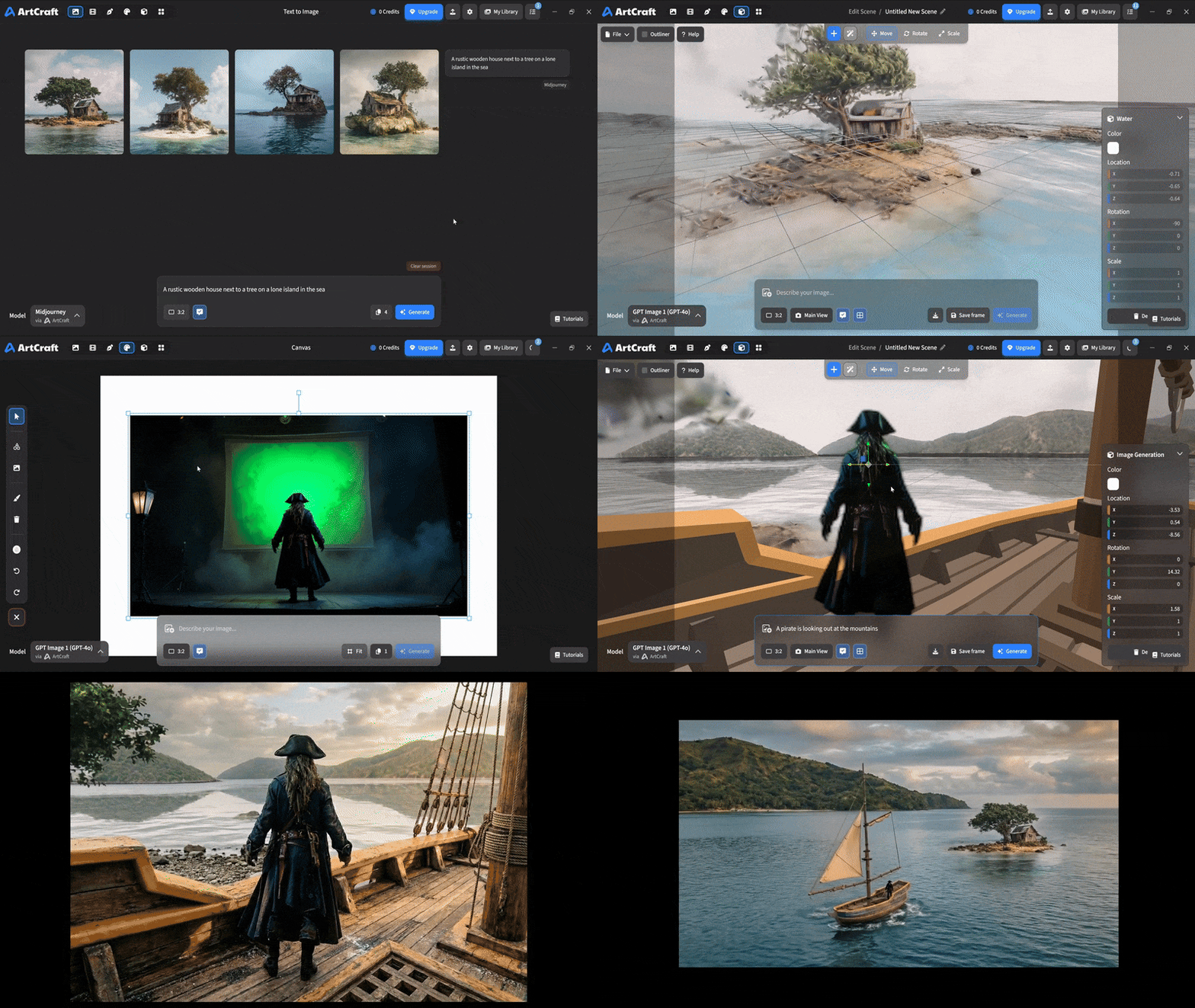 You can use image cutouts, worlds, and simple 3D meshes all together to precisely and intentionally lay out your scenes. |
| Scene Blocking | (preview coming soon) |
| Canvas Editing | (preview coming soon) |
| Scene Relighting | (preview coming soon) |
Note: all of the above videos were generated for free with Grok Video; the cost to build this README was negligible.
Quick and Easy Prompting
We haven't abandoned text-to-asset generation for quick prototyping and ideation. We support every popular workflow in a first class fashion.
| Feature | Demo + Explanation |
|---|---|
| Text to Image | |
| Image Editing | |
| Image Editing | |
| Image to Video | |
| Image Inpainting | (preview coming soon) |
| Image Ingredients | (preview coming soon) |
Models and Providers Supported within Artcraft
| Provider | Features |
|---|---|
| Artcraft | Nano Banana, Nano Banana Pro, GPT-Image-1 / 1.5, Seedance 1.0 Lite / 1.5 Pro / 2.0, Seedream 4 / 4.5, Flux 1.1 / Kontext, Veo 2 / 3 / 3.1, Kling 1.6 / 2.1 / 2.5 / 2.6, Sora 2 / Pro, Hunyuan 3d 2 / 3 |
| Grok | Grok Imagine, Grok Video |
| Midjourney | Image Gen (all versions) |
| Sora | Sora 1, Sora 2, GPT-Image-1 |
| WorldLabs | Marble (Gaussian Splat World Generation) |
We're going to be adding the following providers soon: Kling (via Kling website accounts), Google (via API keys), Runway (via website account), Luma (via website account).
We're potentially interested in adding other aggregators for those who already have subscriptions and credits at those providers, for example: OpenArt, FreePik, etc.
Downloads
- Visit our website for the stable Windows and MacOS releases
- Or you can grab a more recent Windows and MacOS build directly
- Linux requires building from source for now