 Tanish Manku
e2f1b218bc
Migrates the comps that previously read pageHeight/pageWidth from
the artcraft `~/signals` surface; they now use a new useViewportSize
hook that reads through adapter.getViewportSize when supplied (host
threads its existing pageWidth/pageHeight signals through), falling
back to window.innerWidth/innerHeight + a resize listener.

Comps moved:
- Outliner — uses viewport.height for the editor-height calculation
  and viewport.width for the dual-layout breakpoint at 2000px.
- ControlPanelSceneObject — viewport.height for the small-screen
  scale calc.
- SceneContainer — viewport for the container dimensions, with the
  56px TopBar deduction extracted to a TOP_BAR_PX constant.
- PreviewEngineCamera — viewport.width / viewport.height for
  responsive UI thresholds (also drops the explicit useSignals call).
- PreviewImages — viewport-derived image-grid dimensions.

New: src/lib/hooks/useViewportSize.ts. Reactive, adapter-aware, with
a window.innerWidth/innerHeight fallback for hosts that don't supply
getViewportSize.

Apps copies become one-line `export { X } from "@storyteller/ui-
pagescene"` re-export shims.

Lib public API exposes:
- The 5 newly-migrated comps.
- useViewportSize hook (useful to host code that wants the same
  reactivity contract).

Comps still in apps (host-coupled, blocked behind UploadModal3D /
MediaFilesApi / signalScene / addToast / loadingBarData):
- AssetMenu/, ControlsTopButtons/, Controls3D/, EditorLoadingBar,
  OnboardingHelper. These either become adapter render-slots
  (renderAssetBrowser is already on the interface) or get migrated
  once their host deps are surfaced through the adapter.

Verified: artcraft typecheck at 71 errors (one fewer than the prior
72 baseline; the dropped error was a pre-existing implicit-any in
the migrated PreviewEngineCamera that disappeared with the rewrite).
The IDE for artists.


ArtCraft
ArtCraft is the IDE for interactive AI image and video creation. We turn prompting into crafting, so your ideas become a form of tangible expression and computing. This is Adobe Photoshop for everyone, and we're giving away the source code!
Show, Don't Tell: Advanced Crafting Features
Text-to-image is great, but artists need control. It's important to know what your image will look like before you generate it, and it's vitally important to achieve consistency and repeatability.
| Feature | Demo + Explanation |
|---|---|
| Image to Location | |
| 3D Image Compositing | |
| 2D Image Compositing | |
| Image to 3D Mesh | |
| Character Posing | |
| Scene Blocking w/ Kit Bashing | |
| Character Identity Transfer | |
| Background Removal | |
| Mixed Asset Crafting | 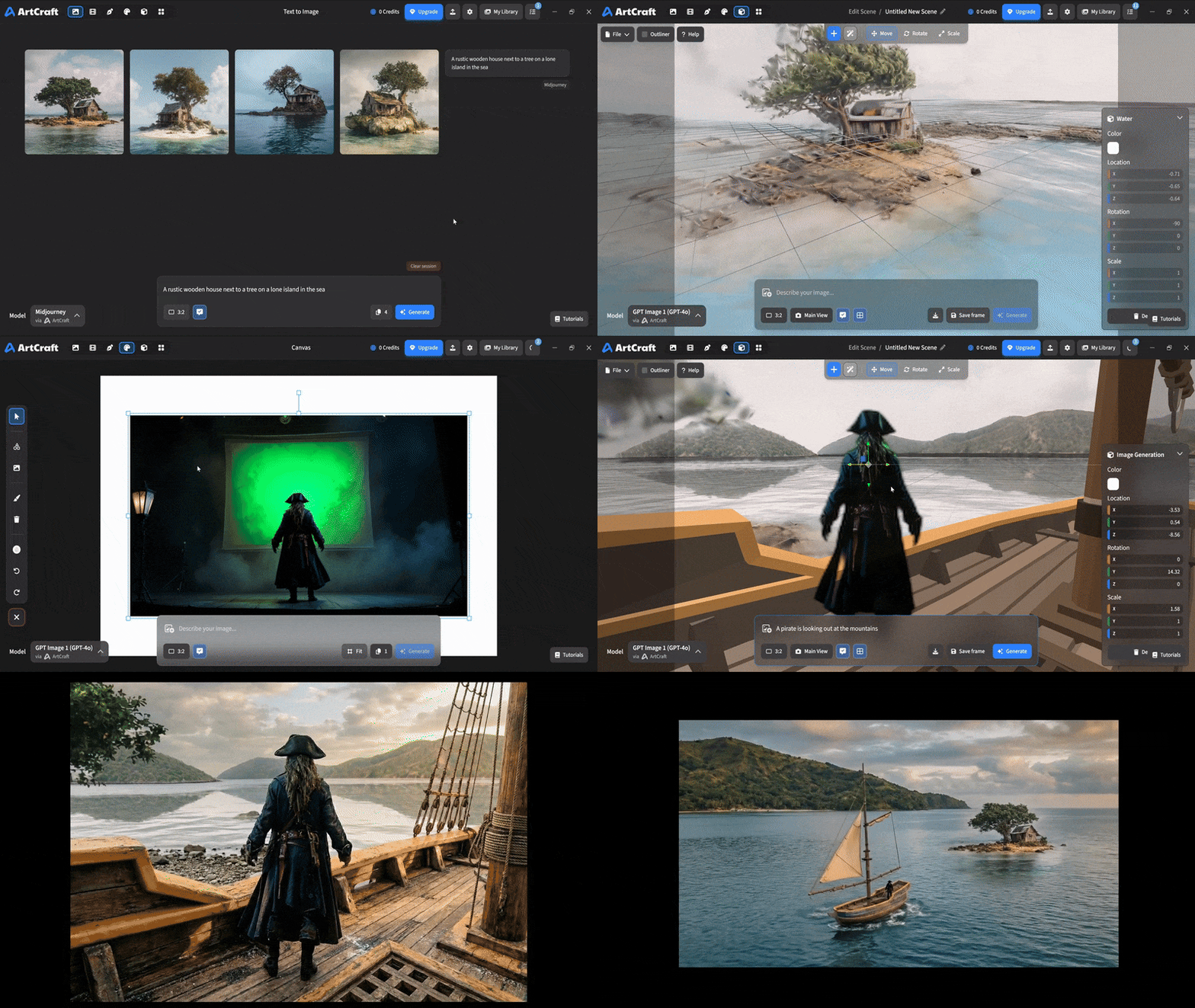 You can use image cutouts, worlds, and simple 3D meshes all together to precisely and intentionally lay out your scenes. |
| Scene Blocking | (preview coming soon) |
| Canvas Editing | (preview coming soon) |
| Scene Relighting | (preview coming soon) |
Note: all of the above videos were generated for free with Grok Video; the cost to build this README was negligible.
Quick and Easy Prompting
We haven't abandoned text-to-asset generation for quick prototyping and ideation. We support every popular workflow in a first class fashion.
| Feature | Demo + Explanation |
|---|---|
| Text to Image | |
| Image Editing | |
| Image Editing | |
| Image to Video | |
| Image Inpainting | (preview coming soon) |
| Image Ingredients | (preview coming soon) |
Models and Providers Supported within Artcraft
| Provider | Features |
|---|---|
| Artcraft | Nano Banana, Nano Banana Pro, GPT-Image-1 / 1.5, Seedance 1.0 Lite / 1.5 Pro / 2.0, Seedream 4 / 4.5, Flux 1.1 / Kontext, Veo 2 / 3 / 3.1, Kling 1.6 / 2.1 / 2.5 / 2.6, Sora 2 / Pro, Hunyuan 3d 2 / 3 |
| Grok | Grok Imagine, Grok Video |
| Midjourney | Image Gen (all versions) |
| Sora | Sora 1, Sora 2, GPT-Image-1 |
| WorldLabs | Marble (Gaussian Splat World Generation) |
We're going to be adding the following providers soon: Kling (via Kling website accounts), Google (via API keys), Runway (via website account), Luma (via website account).
We're potentially interested in adding other aggregators for those who already have subscriptions and credits at those providers, for example: OpenArt, FreePik, etc.
Downloads
- Visit our website for the stable Windows and MacOS releases
- Or you can grab a more recent Windows and MacOS build directly
- Linux requires building from source for now