 BFlat
d538bc2a68
BFlat
d538bc2a68
Adds two new create pages for 3D generation, 3D Object (meshes) and 3D
World (gaussian splats), wired up to the new omni-gen mesh/splat
endpoints, plus the navigation, icons, and polish to go with them.

### New create pages
- 3D Object (`/create-object`): turn a prompt or image into a 3D model.
- 3D World (`/create-world`): turn a prompt or image into an explorable
world.
- Both mirror the existing Create Image/Video experience: prompt box
with model selector and per-model options in the bottom bar, and a live
feed of in-progress, completed, and failed generations.
- Options adapt to the selected model, e.g. output type, polygon type,
geometry/texture quality, face count, PBR and texture toggles,
multi-view reference angles (front/back/left/right), mesh-file input,
reference image/video, panorama, and prompt-only where supported.
- Multi-view and reference slots support the same Upload /
Pick-from-library flow (desktop hover and mobile) as the image rows.
- Completed cards show the model's cover screenshot; clicking one opens
it in the interactive 3D viewer.

### Navigation and discovery
- Sidebar reorganized into two groups: Create (Image, Video, Audio, 3D
Object, 3D World) and a new Studio group (Edit Image, Edit 3D, Edit
Video, BG Change, Moodboard).
- Added 3D Object and 3D World cards to the Home page.
- Added breadcrumbs for the new pages.
- Added a My Library button to the top bar, next to the credits and
task-queue chips.

### Model icons
- Restored the Hunyuan (Tencent) and World Labs provider icons.
- Added Tripo, Meshy, and Rodin (Hyper3D) icons.
- Applied to both the webapp and desktop app.

### Fixes and polish
- Fixed the 3D-model icons showing a generic placeholder (missing cyan
color plus creator mappings).
- Fixed the Upload / Pick-from-library hover popover being clipped
inside glass panels.
- Reference-image rows in the 3D pages now align their fields to the
right with the title on the left, matching the other create pages.
- Prevented 3D-model cover screenshots from showing up as their own "3D
object" cards across the 3D feeds, the Library page, and the gallery
picker.
The IDE for artists.




ArtCraft
ArtCraft is the IDE for interactive AI image and video creation. We turn prompting into crafting, so your ideas become a form of tangible expression and computing. This is Adobe Photoshop for everyone, and we're giving away the source code!
Show, Don't Tell: Advanced Crafting Features
Text-to-image is great, but artists need control. It's important to know what your image will look like before you generate it, and it's vitally important to achieve consistency and repeatability.
| Feature | Demo + Explanation |
|---|---|
| Image to Location | |
| 3D Image Compositing | |
| 2D Image Compositing | |
| Image to 3D Mesh | |
| Character Posing | |
| Scene Blocking w/ Kit Bashing | |
| Character Identity Transfer | |
| Background Removal | |
| Mixed Asset Crafting | 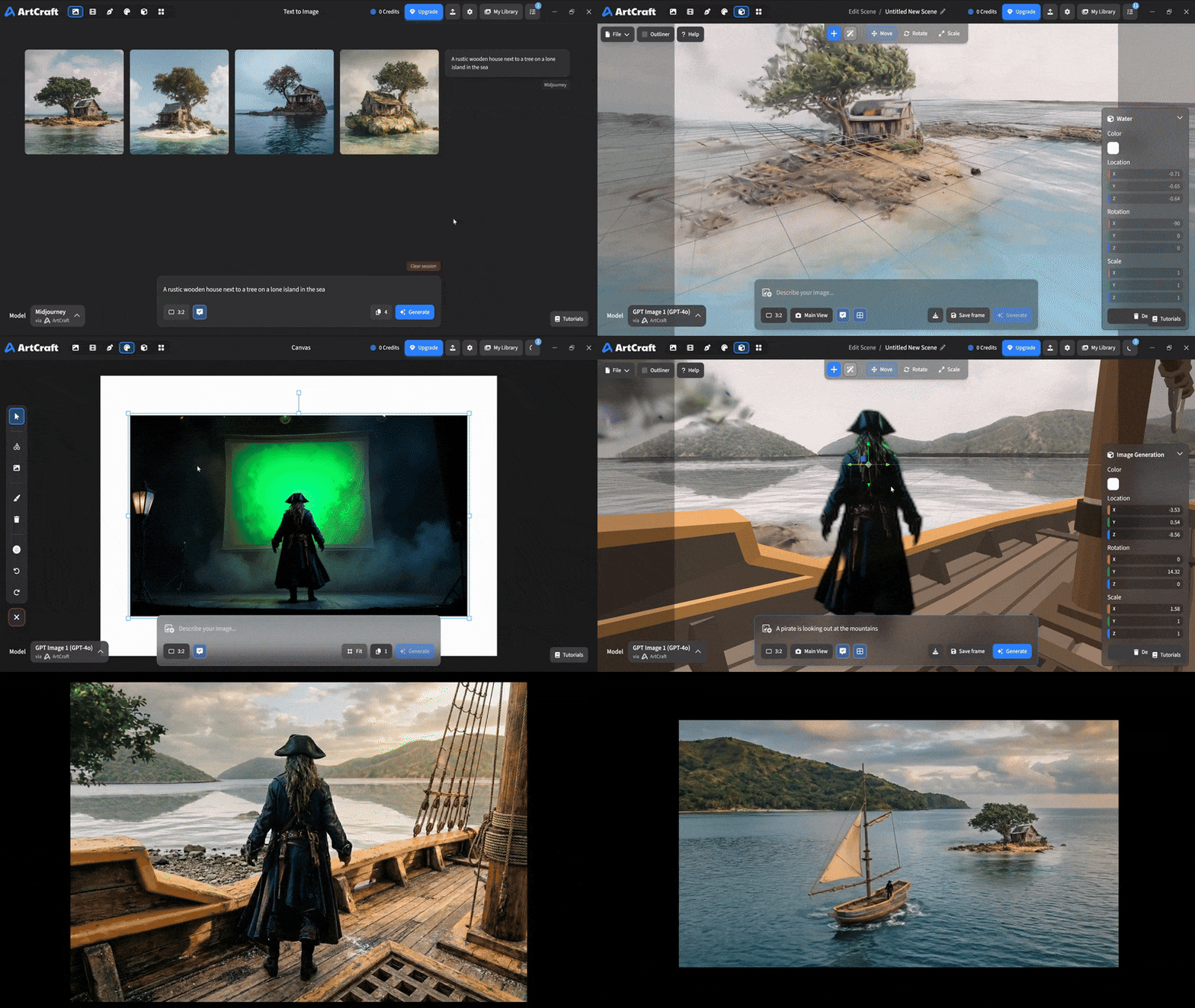 You can use image cutouts, worlds, and simple 3D meshes all together to precisely and intentionally lay out your scenes. You can use image cutouts, worlds, and simple 3D meshes all together to precisely and intentionally lay out your scenes. |
| Scene Blocking | (preview coming soon) |
| Canvas Editing | (preview coming soon) |
| Scene Relighting | (preview coming soon) |
Note: all of the above videos were generated for free with Grok Video; the cost to build this README was negligible.
Quick and Easy Prompting
We haven't abandoned text-to-asset generation for quick prototyping and ideation. We support every popular workflow in a first class fashion.
| Feature | Demo + Explanation |
|---|---|
| Text to Image | |
| Image Editing | |
| Image Editing | |
| Image to Video | |
| Image Inpainting | (preview coming soon) |
| Image Ingredients | (preview coming soon) |
Models and Providers Supported within Artcraft
| Provider | Features |
|---|---|
| Artcraft | Nano Banana, Nano Banana Pro, GPT-Image-1 / 1.5, Seedance 1.0 Lite / 1.5 Pro / 2.0, Seedream 4 / 4.5, Flux 1.1 / Kontext, Veo 2 / 3 / 3.1, Kling 1.6 / 2.1 / 2.5 / 2.6, Sora 2 / Pro, Hunyuan 3d 2 / 3 |
| Grok | Grok Imagine, Grok Video |
| Midjourney | Image Gen (all versions) |
| Sora | Sora 1, Sora 2, GPT-Image-1 |
| WorldLabs | Marble (Gaussian Splat World Generation) |
We're going to be adding the following providers soon: Kling (via Kling website accounts), Google (via API keys), Runway (via website account), Luma (via website account).
We're potentially interested in adding other aggregators for those who already have subscriptions and credits at those providers, for example: OpenArt, FreePik, etc.
Downloads
- Visit our website for the stable Windows and MacOS releases
- Or you can grab a more recent Windows and MacOS build directly
- Linux requires building from source for now