 Tanish Manku
c352edd38c
First step of the editor.ts decomposition (refactor/3d-editor-cleanup).
Pulls the canvas/container DOM seam, the ResizeObserver, and the resize
cascade out of the ~1450-LOC Editor class into a standalone module.

ViewportController owns container, canvReference, canvasRenderCamReference,
the ResizeObserver, lastCanvasSize, plus the onWindowResize / observed
resize logic.

Engine fields are forwarded explicitly through the `engine` constructor
argument:
  - cameras, renderer, render aspect ratio: closure-based getters that
    resolve at call time
  - post-processing: a single resizePostProcessing(w, h) callback rather
    than three composer field getters

The single callback is deliberate. The original code creates the main
composer in _configurePostProcessing but the raw composer + custom
outline pass much later in _configurePostProcessingRaw, with the first
viewport.onWindowResize() landing between the two. Three separate
composer getters would have ViewportController peeking at fields that
don't exist yet at that first resize and silently no-op'ing via `?.`.
The callback hides that lifecycle concern inside the post-processing
module, where it belongs.

No `import type Editor`, no circular import. The dead `update*` and
`*MayReset` accessors that the original code carried as defensive
fallbacks (with self-deprecating "we should not need this" comments)
were never actually called and are dropped here. containerMayReset
stays — it has live internal callers.

Editor exposes the controller as `editor.viewport` and routes its
internal call sites through `this.viewport.<method>()`.

Net: editor.ts loses ~107 lines and one cohesive responsibility.
The IDE for artists.


ArtCraft
ArtCraft is the IDE for interactive AI image and video creation. We turn prompting into crafting, so your ideas become a form of tangible expression and computing. This is Adobe Photoshop for everyone, and we're giving away the source code!
Show, Don't Tell: Advanced Crafting Features
Text-to-image is great, but artists need control. It's important to know what your image will look like before you generate it, and it's vitally important to achieve consistency and repeatability.
| Feature | Demo + Explanation |
|---|---|
| Image to Location | |
| 3D Image Compositing | |
| 2D Image Compositing | |
| Image to 3D Mesh | |
| Character Posing | |
| Scene Blocking w/ Kit Bashing | |
| Character Identity Transfer | |
| Background Removal | |
| Mixed Asset Crafting | 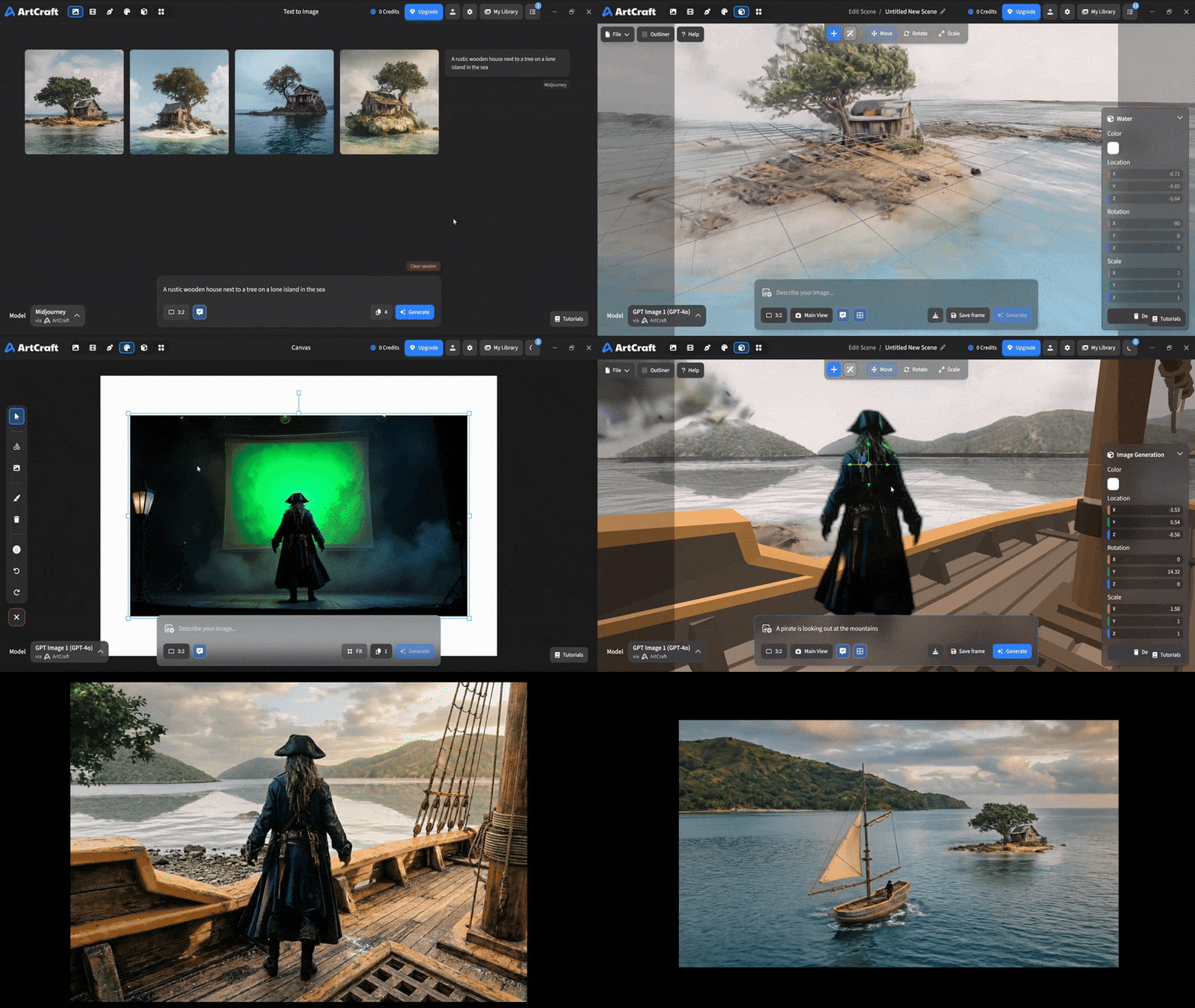 You can use image cutouts, worlds, and simple 3D meshes all together to precisely and intentionally lay out your scenes. |
| Scene Blocking | (preview coming soon) |
| Canvas Editing | (preview coming soon) |
| Scene Relighting | (preview coming soon) |
Note: all of the above videos were generated for free with Grok Video; the cost to build this README was negligible.
Quick and Easy Prompting
We haven't abandoned text-to-asset generation for quick prototyping and ideation. We support every popular workflow in a first class fashion.
| Feature | Demo + Explanation |
|---|---|
| Text to Image | |
| Image Editing | |
| Image Editing | |
| Image to Video | |
| Image Inpainting | (preview coming soon) |
| Image Ingredients | (preview coming soon) |
Models and Providers Supported within Artcraft
| Provider | Features |
|---|---|
| Artcraft | Nano Banana, Nano Banana Pro, GPT-Image-1 / 1.5, Seedance 1.0 Lite / 1.5 Pro / 2.0, Seedream 4 / 4.5, Flux 1.1 / Kontext, Veo 2 / 3 / 3.1, Kling 1.6 / 2.1 / 2.5 / 2.6, Sora 2 / Pro, Hunyuan 3d 2 / 3 |
| Grok | Grok Imagine, Grok Video |
| Midjourney | Image Gen (all versions) |
| Sora | Sora 1, Sora 2, GPT-Image-1 |
| WorldLabs | Marble (Gaussian Splat World Generation) |
We're going to be adding the following providers soon: Kling (via Kling website accounts), Google (via API keys), Runway (via website account), Luma (via website account).
We're potentially interested in adding other aggregators for those who already have subscriptions and credits at those providers, for example: OpenArt, FreePik, etc.
Downloads
- Visit our website for the stable Windows and MacOS releases
- Or you can grab a more recent Windows and MacOS build directly
- Linux requires building from source for now