
 BFlatandClaude Opus 5.5
b5614ad333
BFlatandClaude Opus 5.5
b5614ad333
## What

A new workspace member, `artcraft-native/`. It is the ArtCraft desktop
app in pure Rust: an egui UI with no Tauri, no webview and no
JavaScript. It covers the two main product pages, **Create Image** and
**Create Video**, and reuses the Tauri-free API crates
(`artcraft_client`, `artcraft_api_defs`, `tokens`, `enums`).

It also adds:
- a Home page and a Library page
- a lightbox
- sign-in and settings dialogs
- a sidebar and top bar in the style of the brutalist
**artcraft-webapp**

Tools that aren't ported yet show a "coming soon" page that links to the
web app.

```bash
cargo run -p artcraft_native --release
```

## Why

To get a native, webview-free desktop app. Generation goes through
**OmniGen** (`/v1/omni_gen/{models,cost,generate}`), the same API as the
webapp. Model capabilities come from the server, so the pickers stay
current without app updates.

## Prompt box

Recreated feature for feature from `PromptBoxImage` / `PromptBoxVideo`:
- **Editor:** auto-grow, focus mode, resize grip, length counter with
the model's limit, Enter-to-generate setting, and `@Image1` / `@Video1`
/ `@Audio1` mentions with highlighting and autocomplete.
- **References:** the fanned reference deck (hover-expand, reorder, add
menus with limits) and the first/last keyframe slots with swap. Files
can be uploaded, picked from the library, dragged and dropped, or pasted
as images.
- **Model selector:** families with a flyout, maker logos and capability
badges.
- **Pickers:** aspect ratio, resolution, quality, count, bitrate, output
format, duration slider, sound and input mode (Keyframe / Omni
Reference).
- **Generate:** a live credit cost estimate, validation (starting frame,
text-only models, limits, uploads in progress), and clear-all with
confirmation.

The feed shows running jobs (with progress and time left), failures
(dismissable), finished results and the paginated library, in a masonry
grid or a list. It supports Recreate, Make Video, Share and Download,
plus select mode for batch downloads.

## Reviewer notes

- **Sign-in.** On first launch the app reuses an existing desktop login
by reading the session cookie from the Tauri app's jar, and keeps its
own copy in `~/Artcraft/credentials/native_session.json`. Browser
(device-code) and password sign-in are also available.
- **Decoding.**
- Generate and cost requests are sent as JSON maps, like the Tauri app's
omni path.
- Jobs, library, batch and prompt responses use lenient structs
(`backend/wire.rs`), so new server enum values can't break decoding.
- **Renderer.** It uses eframe's **glow** renderer. `wgpu-hal` fails to
build against the `windows` crate versions this workspace pins for
Tauri.
- **Model names and logos.** Known families use curated names: "Flux 1
Dev" rather than the server's "FLUX.1 [dev]". When the server reports
`artcraft` as a model's maker, the logo comes from the id prefix instead
(Nano Banana → Google), matching the webapp.
- **Fonts and assets.** Inter, Archivo and Geist Mono are bundled under
the OFL and listed in `NOTICE`. The wordmark, icon and maker logos are
the existing in-repo assets.
- **Diagnostics.** `ARTCRAFT_SCREENSHOT=<png>` (optionally with
`ARTCRAFT_PAGE` and `ARTCRAFT_SCREENSHOT_EXIT=1`) saves a screenshot
once the window has settled.

## Testing

- `cargo test -p artcraft_native`: 29 tests pass. Unit tests cover the
catalog, feed store, wire decoding and backend helpers. Headless
`egui_kittest` tests drive the prompt box: generate gating,
Enter-to-generate, pickers, `@` mentions and clear-all.
- `cargo clippy -p artcraft_native --all-targets --no-deps` is clean.
- Run against a real account: the session import, model lists, cost
estimates, job polling, library paging and thumbnails all worked.
- **Not exercised: a real paid generation and real uploads.** I held
back to avoid spending credits, so they need a manual check.

## Not done yet

- `@Character` mentions for Seedance 2.0
- Provider choice (Midjourney direct, fal); everything runs through
ArtCraft
- In-app video and audio playback; these open in the system player
- Animated previews in the feed
- The remaining tools (Audio, 3D, editors)

🤖 Generated with [Claude Code](https://claude.com/claude-code)

Co-authored-by: Claude Opus 5.5 <noreply@anthropic.com>
ArtCraft
The IDE for artists.
https://github.com/user-attachments/assets/7339bd09-3e0d-44a7-a024-af9de64e4c11
Watch the two-minute ArtCraft demo on YouTube




Download ArtCraft · GitHub releases · Build from source
ArtCraft is the IDE for interactive AI image and video creation. Compose in 2D, stage scenes in 3D, and choose the models that fit your work. Turn prompting into crafting with visual tools for precise, repeatable results.
Show, Don't Tell: Advanced Crafting Features
Artists need control over composition, character identity, and camera placement. Build the scene before you generate it. Click any preview to view it at full size.
| Feature | Preview |
|---|---|
| Image to Location Place virtual actors in a consistent environment and plan multiple shots in the same room. |
|
| 3D Image Compositing Layer backdrops, foregrounds, and props in 3D to build compositions with depth. |
|
| 2D Image Compositing Compose a scene with image layers, background removal, and drawing tools. |
|
| Image to 3D Mesh Turn an image into a 3D object you can position, rotate, and frame precisely. |
|

| Character Posing Pose characters and set your camera before generating the final shot. |
 |
| Scene Blocking with Kitbashing Combine 3D asset kits to control camera angles, object placement, and depth. |
|
| Character Identity Transfer Use a posed mannequin to guide the placement and pose of your character. |
|
| Background Removal Isolate subjects to use as props, layers, or backdrops in 2D and 3D scenes. |
|
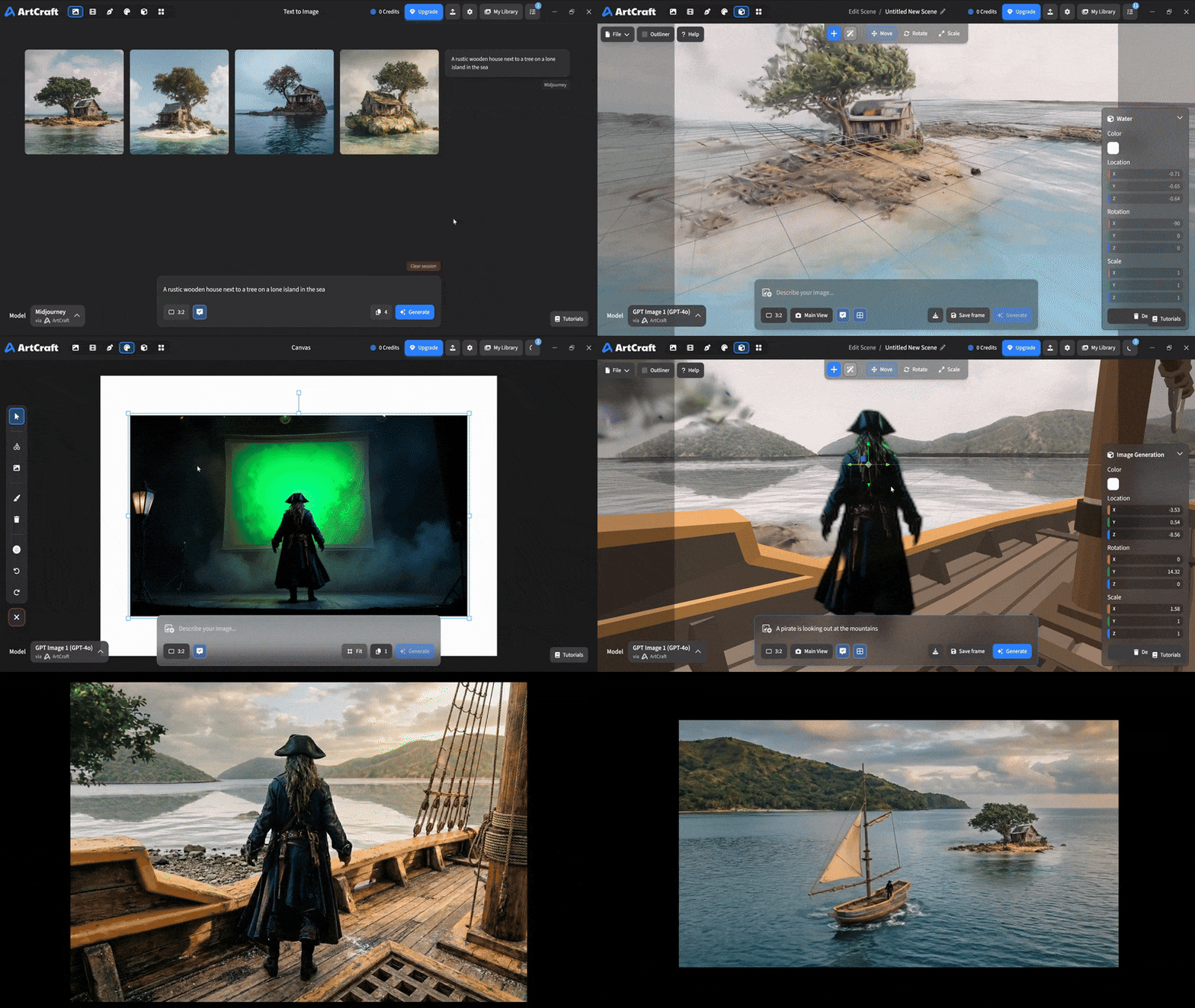
| Mixed Asset Crafting Combine image cutouts, worlds, and 3D meshes in one scene. |
 |
More previews are coming for scene blocking, canvas editing, and scene relighting.
Quick and Easy Prompting
Start with a prompt when you want to explore an idea quickly, then use the canvas and scene tools to refine it.
| Feature | Preview |
|---|---|
| Text to Image Explore ideas across a wide range of image models with a text prompt. |
|
| Prompted Image Editing Describe changes to an image with models such as Nano Banana Pro and GPT Image. |
|
| Canvas Image Editing Use drawing, masks, and inpainting to guide exactly where an image changes. |
|
| Image to Video Animate an image with your choice of video models and generation controls. |
More previews are coming for image inpainting and image ingredients.
Models and Providers Supported within ArtCraft
| Provider | Models and workflows |
|---|---|
| ArtCraft | Images, video, music and sound, 3D meshes, and worlds. Browse the complete model catalog below. |
| Grok | Grok Imagine and Grok Video. |
| Midjourney | Midjourney image generation. |
| Sora | Sora 1, Sora 2, and GPT Image 1. |
| World Labs | Marble world generation with Gaussian splats. |
ArtCraft: the full 62-model catalog
† Currently disabled. ‡ Restricted model; not currently available in the desktop app.
Images (16)
| Family | Models |
|---|---|
| Nano Banana | Nano Banana; Nano Banana 2; Nano Banana Pro |
| GPT Image | GPT Image 1.5; GPT Image 2; GPT Image 2.5 Flare; GPT Image 2.5 Sunburst |
| FLUX | FLUX.1 [dev]; FLUX.1 [schnell]; FLUX 1.1 [pro]; FLUX 1.1 [pro] ultra |
| Seedream | Seedream 4; Seedream 4.5; Seedream 5 Lite; Seedream 5.0 Pro; Seedream 5.0 Pro Ultra |
Video (25)
| Family | Models |
|---|---|
| Seedance | Seedance 1.0 Lite †; Seedance 1.5 Pro; Seedance 2.0 |
| Kling | Kling 1.6 Pro; Kling 2.1 Pro †; Kling 2.1 Master †; Kling 2.5 Turbo Pro; Kling 2.6 Pro; Kling 3.0 Pro †; Kling 3.0 Standard † |
| Veo | Veo 2 †; Veo 3 †; Veo 3 Fast; Veo 3.1; Veo 3.1 Fast; Veo 3.1 Lite |
| Sora | Sora 2 †; Sora 2 Pro † |
| Vidu | Vidu Q3; Vidu Q3 Turbo |
| MiniMax | MiniMax H3; MiniMax H3 Turbo ‡; MiniMax H3 Ultra ‡ |
| Flux | Flux 3; Flux 3 Draft |
Music and sound (5)
| Family | Models |
|---|---|
| Suno | Suno Music; Suno Remix; Suno Sounds; Suno Sample |
| Seed Audio | Seed Audio 1.0 |
3D meshes (11)
| Family | Models |
|---|---|
| Hunyuan 3D | Hunyuan 3D 2.0; Hunyuan 3D 2.1; Hunyuan 3D 3; Hunyuan 3D 3 Sketch; Hunyuan 3D 3.1 Pro; Hunyuan 3D 3.1 Rapid; Hunyuan 3D 3.1 Part; Hunyuan 3D 3.1 Smart Topology |
| Tripo3D | Tripo3D H3.1 |
| Meshy | Meshy 6 |
| Rodin | Rodin 2.5 Fast |
Worlds and Gaussian splats (5)
| Family | Models |
|---|---|
| Marble | Marble 1.0; Marble 1.0 Draft; Marble 1.1; Marble 1.1 Plus |
| TripoSplat | TripoSplat |
Additional provider integrations are planned for Kling, Google, Runway, and Luma. We're also interested in supporting existing subscriptions with aggregators such as OpenArt and Freepik.
Downloads
Documentation
License
ArtCraft is dual-licensed under MIT or Apache-2.0, at your option. Copyright (c) 2026 ArtCraft Team and the ArtCraft contributors. Required notices, including third-party material not covered by this license, are in NOTICE.