 BFlat
8da68b009c
## Summary

Reworks the desktop (Tauri) app's Create Image / Create Video pages to
match the webapp,
extracts the webapp's generation gallery into a shared library used by
both apps, embeds the
model selector into every prompt box, adds a folders sidebar + marquee
selection to the gallery
modal, restyles the login/pricing/credits modals to the webapp look, and
turns the Apps page
into the default landing tab.

### Shared generation-list lib

- Extracted the webapp's generation feed into
`@storyteller/ui-generation-list`: list + masonry
grid views, pending/failed/completed rows and cards, thumbnail handling,
gallery/prompt data
hooks, and the shared grid/list view store + toggle. Host-specific
actions (recreate,
make-video, share, download, toasts) inject via render props — webapp
markup unchanged, its
  old files are now thin wrappers.

### Desktop create pages

- Prompt box fixed at the bottom, `max-w-5xl` like the webapp; pages
renamed to
  "Create Image" / "Create Video".
- Generation feed: in-progress/failed from the Tauri task queue, history
from the library API,
rendered as grid or list (toggle in the TopBar next to credits). Typed
Tauri completion events
  push finished media in instantly; the poll reconciles and dedupes.
- Row/card quick actions (recreate, make video, copy link, download)
backed by a shared
  `desktopMediaActions` module extracted from the TopBar gallery wiring.
- Hero + background act as a splash that fades when the feed loads;
bottom gradient behind the
prompt box. Batch generations show "Generating N images" on the single
pending chip.
- Video prompt box now expands vertically as far as the image prompt box
(viewport-relative).

### Embedded model selector

- `ClassyModelSelector` gained `variant="embedded"`: a compact pill that
opens the webapp-style
rich-list popover while keeping the desktop's provider selection.
Embedded on all five
prompt-input pages; floating selectors removed; legacy "10 sec." badges
dropped.

### Gallery modal

- Left sidebar lists the user's folders (drag-and-drop, right-click
management, new-folder
button) and shows on the Folders tab too, highlighting the active
folder's root branch.
- Marquee (drag-rectangle) selection in view mode, with edge
auto-scroll; starts only on blank
  background so it doesn't interfere with drag-to-folder/canvas.

### Restyled modals (desktop)

- Login/signup: webapp 2-column layout (form left, Vimeo showcase
right), no Google button
(Google auth isn't wired for Tauri), `artcraft-icon` logo, eye toggles.
The dismiss button is
removed so login is required; the post-auth Discord + Success onboarding
steps are kept, as is
  the existing Tauri auth flow.
- Pricing + credits: match the webapp visually (unified monochrome plan
cards with
Most Popular / Best Value highlight frames; `#161618` credit-pack cards
with Popular badge).
All billing stays on the existing Tauri `invoke` calls — no billing
logic changed.

### Apps page / navigation

- The Apps page is now the first tab and the default landing tab, with a
Home icon. Restyled to
the webapp home: "What will you craft today?" hero, Create / Edit
sections, gradient-hover
cards sized to their content, full-width scrollbar. The TopBar
quick-menu header reads
  "Create" instead of "Generate".

### Fixes

- Video Editor no longer crashes on the desktop app (`Tooltip must be
used within
TooltipProvider`): the editor shell now mounts its own Radix
`TooltipProvider`. The webapp got
one app-wide via `SidebarProvider`; the Tauri app had none, so panel
tooltips threw.

### Misc

- `getCreatorIconPathForModelId()` added to `@storyteller/model-list`
(model id → creator icon
  path, desktop/webapp aware).
The IDE for artists.


ArtCraft
ArtCraft is the IDE for interactive AI image and video creation. We turn prompting into crafting, so your ideas become a form of tangible expression and computing. This is Adobe Photoshop for everyone, and we're giving away the source code!
Show, Don't Tell: Advanced Crafting Features
Text-to-image is great, but artists need control. It's important to know what your image will look like before you generate it, and it's vitally important to achieve consistency and repeatability.
| Feature | Demo + Explanation |
|---|---|
| Image to Location | |
| 3D Image Compositing | |
| 2D Image Compositing | |
| Image to 3D Mesh | |
| Character Posing | |
| Scene Blocking w/ Kit Bashing | |
| Character Identity Transfer | |
| Background Removal | |
| Mixed Asset Crafting | 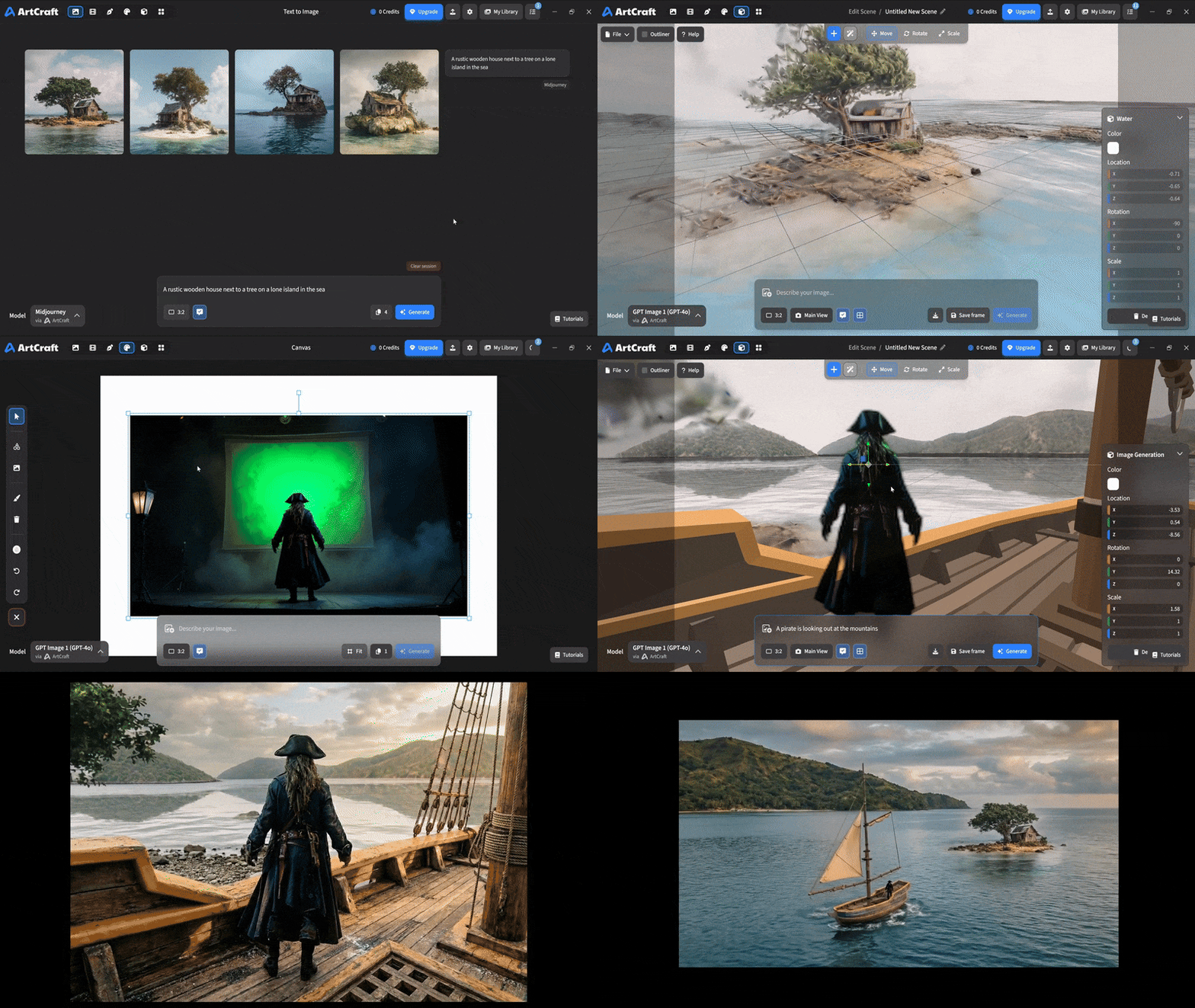 You can use image cutouts, worlds, and simple 3D meshes all together to precisely and intentionally lay out your scenes. |
| Scene Blocking | (preview coming soon) |
| Canvas Editing | (preview coming soon) |
| Scene Relighting | (preview coming soon) |
Note: all of the above videos were generated for free with Grok Video; the cost to build this README was negligible.
Quick and Easy Prompting
We haven't abandoned text-to-asset generation for quick prototyping and ideation. We support every popular workflow in a first class fashion.
| Feature | Demo + Explanation |
|---|---|
| Text to Image | |
| Image Editing | |
| Image Editing | |
| Image to Video | |
| Image Inpainting | (preview coming soon) |
| Image Ingredients | (preview coming soon) |
Models and Providers Supported within Artcraft
| Provider | Features |
|---|---|
| Artcraft | Nano Banana, Nano Banana Pro, GPT-Image-1 / 1.5, Seedance 1.0 Lite / 1.5 Pro / 2.0, Seedream 4 / 4.5, Flux 1.1 / Kontext, Veo 2 / 3 / 3.1, Kling 1.6 / 2.1 / 2.5 / 2.6, Sora 2 / Pro, Hunyuan 3d 2 / 3 |
| Grok | Grok Imagine, Grok Video |
| Midjourney | Image Gen (all versions) |
| Sora | Sora 1, Sora 2, GPT-Image-1 |
| WorldLabs | Marble (Gaussian Splat World Generation) |
We're going to be adding the following providers soon: Kling (via Kling website accounts), Google (via API keys), Runway (via website account), Luma (via website account).
We're potentially interested in adding other aggregators for those who already have subscriptions and credits at those providers, for example: OpenArt, FreePik, etc.
Downloads
- Visit our website for the stable Windows and MacOS releases
- Or you can grab a more recent Windows and MacOS build directly
- Linux requires building from source for now