 Tanish Manku
8a03449128
Replace MouseControls.onkeydown's giant if-else chain with a
declarative keymap:

- engine/keymap.ts: KeyBinding type + buildKeymap() returning every
  one-shot viewport shortcut as one entry. Each carries label /
  group metadata so a future Ctrl-hold cheatsheet overlay can read
  the same array. dispatchBinding() does the modifier match
  (treating Ctrl and Meta as equivalent for macOS).
- hooks/useViewportKeyboard.ts: attaches a single keydown listener
  that gates on hotkeyStatus + editable-element checks, then walks
  the keymap. Held movement keys (W/A/S/D etc.) live in useFreeCam
  since they're continuous; this hook is for one-shots only.

The listener is on document, not the canvas, deliberately: canvas
focus is finicky and would require the user to click the viewport
before T/R/G work. The editable-element guard prevents the keymap
from firing while inputs are focused.

MouseControls.onkeydown is now unreachable (SceneManager's window
listeners are no-op since the previous commit, and useViewportKeyboard
goes straight to keymap dispatch). The class itself stays for now —
it still implements selection / FK / pointer-lock state.
The IDE for artists.


ArtCraft
ArtCraft is the IDE for interactive AI image and video creation. We turn prompting into crafting, so your ideas become a form of tangible expression and computing. This is Adobe Photoshop for everyone, and we're giving away the source code!
Show, Don't Tell: Advanced Crafting Features
Text-to-image is great, but artists need control. It's important to know what your image will look like before you generate it, and it's vitally important to achieve consistency and repeatability.
| Feature | Demo + Explanation |
|---|---|
| Image to Location | |
| 3D Image Compositing | |
| 2D Image Compositing | |
| Image to 3D Mesh | |
| Character Posing | |
| Scene Blocking w/ Kit Bashing | |
| Character Identity Transfer | |
| Background Removal | |
| Mixed Asset Crafting | 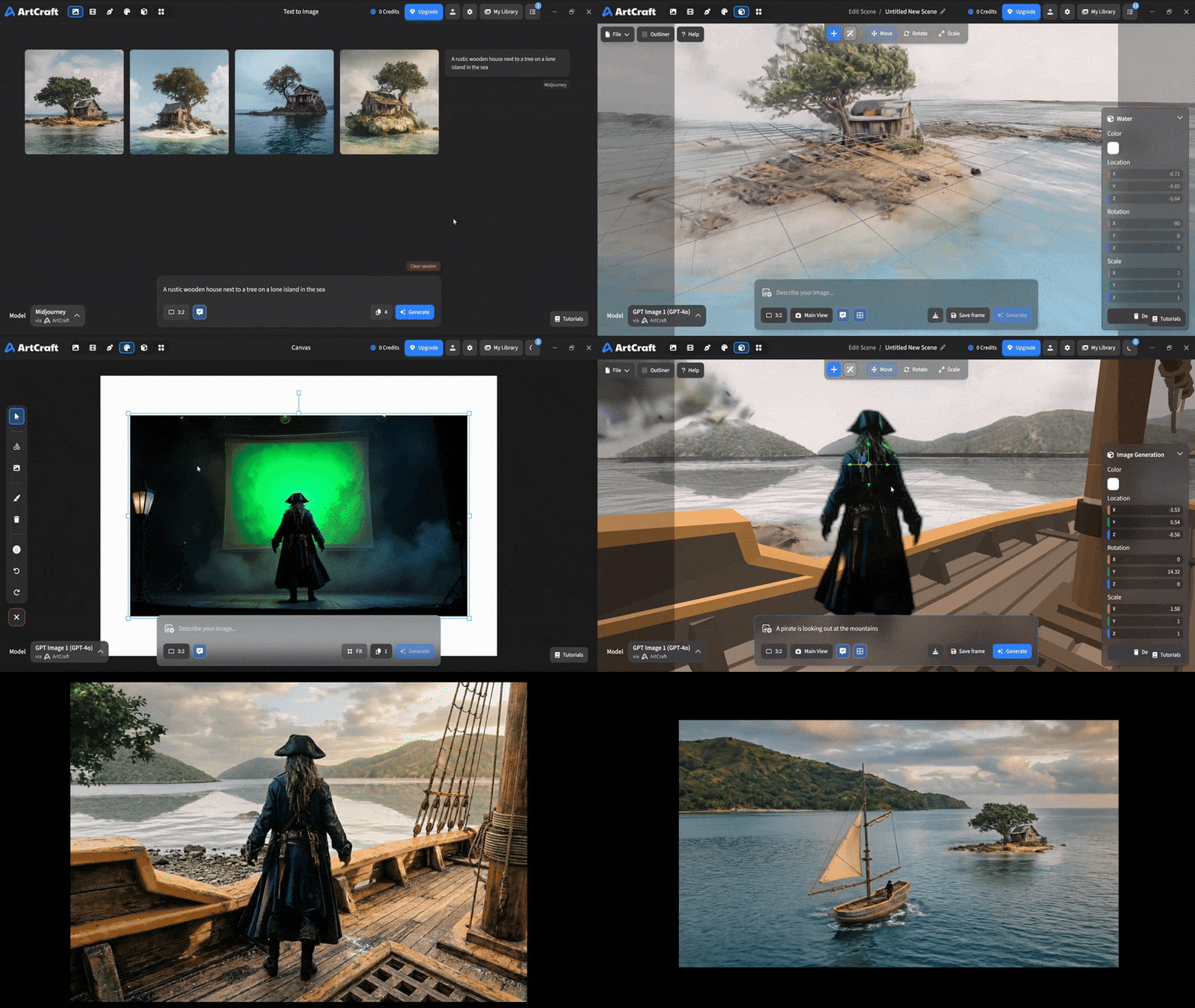 You can use image cutouts, worlds, and simple 3D meshes all together to precisely and intentionally lay out your scenes. |
| Scene Blocking | (preview coming soon) |
| Canvas Editing | (preview coming soon) |
| Scene Relighting | (preview coming soon) |
Note: all of the above videos were generated for free with Grok Video; the cost to build this README was negligible.
Quick and Easy Prompting
We haven't abandoned text-to-asset generation for quick prototyping and ideation. We support every popular workflow in a first class fashion.
| Feature | Demo + Explanation |
|---|---|
| Text to Image | |
| Image Editing | |
| Image Editing | |
| Image to Video | |
| Image Inpainting | (preview coming soon) |
| Image Ingredients | (preview coming soon) |
Models and Providers Supported within Artcraft
| Provider | Features |
|---|---|
| Artcraft | Nano Banana, Nano Banana Pro, GPT-Image-1 / 1.5, Seedance 1.0 Lite / 1.5 Pro / 2.0, Seedream 4 / 4.5, Flux 1.1 / Kontext, Veo 2 / 3 / 3.1, Kling 1.6 / 2.1 / 2.5 / 2.6, Sora 2 / Pro, Hunyuan 3d 2 / 3 |
| Grok | Grok Imagine, Grok Video |
| Midjourney | Image Gen (all versions) |
| Sora | Sora 1, Sora 2, GPT-Image-1 |
| WorldLabs | Marble (Gaussian Splat World Generation) |
We're going to be adding the following providers soon: Kling (via Kling website accounts), Google (via API keys), Runway (via website account), Luma (via website account).
We're potentially interested in adding other aggregators for those who already have subscriptions and credits at those providers, for example: OpenArt, FreePik, etc.
Downloads
- Visit our website for the stable Windows and MacOS releases
- Or you can grab a more recent Windows and MacOS build directly
- Linux requires building from source for now