 bflatastic
8334e43886
Align the shared @storyteller/ui-moodboard surface with the webapp's design
language across both hosts (Tauri desktop + webapp), plus several UX fixes.

Theming & layout
- Use `var(--st-bg, hsl(0 0% 9%))` for the workspace/grid background so desktop
  follows the active theme while the webapp falls back to its --background token
  (replaces the desktop-only bg-ui-background class).
- Fix desktop overflow: the fixed TopBar is 56px, so the moodboard tab now uses
  h-screen + pt-[56px] + overflow-hidden, killing the stray vertical/horizontal
  scrollbars on an empty board. Grid view root clips too.

Empty state & toolbars
- Empty-state Upload / From-library CTAs now use the shared Button, matching the
  webapp create pages (h-12, pill, semibold; primary + secondary).
- Restyle SelectionBar to match the library multiselect bar (solid pill, filled
  bg-ui-controls buttons, red Delete, round clear); align the "Move to"
  menu/items/Kbd to the same idiom.
- Restyle SmartSearchBar (bg-ui-controls, rounded-xl) and tighten ToolbarShell
  padding.
- Add a tooltip to the toolbar's Add Color button to match the sibling buttons.

Notes
- Adding a note creates an empty, immediately-editable note (autofocusing inline
  textarea; commit on blur/Enter, Shift+Enter newline, Esc reverts); double-click
  re-enters edit mode — no more stuck "New note".
- Pad the note's top so the selection check no longer overlaps the first line.

Selection
- Clicks accumulate: clicking an item adds it to the selection (clicking again
  removes it), so multi-select builds up without a modifier; background click
  clears. "Use as reference" only shows when the selection has a
  reference-capable image.

Item inspector
- Redesign ItemInspector to mirror the shared LightboxModal: a bounded, centered,
  draggable/resizable Modal with media on a dark plate, hover nav arrows, and a
  fixed info/actions column using shared Buttons.

Webapp homepage
- Add a Moodboard card next to Edit Video on the webapp home page.
The IDE for artists.


ArtCraft
ArtCraft is the IDE for interactive AI image and video creation. We turn prompting into crafting, so your ideas become a form of tangible expression and computing. This is Adobe Photoshop for everyone, and we're giving away the source code!
Show, Don't Tell: Advanced Crafting Features
Text-to-image is great, but artists need control. It's important to know what your image will look like before you generate it, and it's vitally important to achieve consistency and repeatability.
| Feature | Demo + Explanation |
|---|---|
| Image to Location | |
| 3D Image Compositing | |
| 2D Image Compositing | |
| Image to 3D Mesh | |
| Character Posing | |
| Scene Blocking w/ Kit Bashing | |
| Character Identity Transfer | |
| Background Removal | |
| Mixed Asset Crafting | 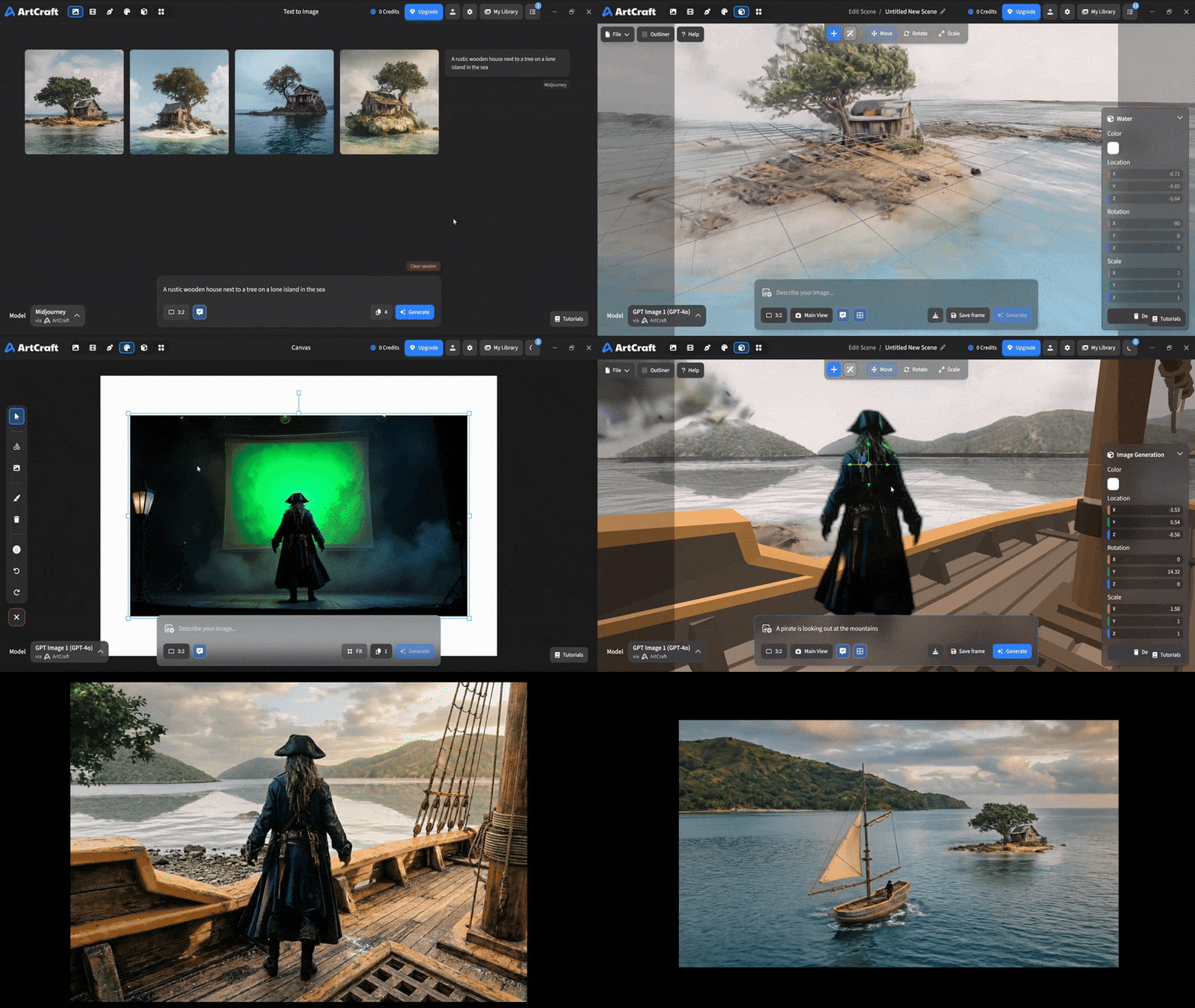 You can use image cutouts, worlds, and simple 3D meshes all together to precisely and intentionally lay out your scenes. |
| Scene Blocking | (preview coming soon) |
| Canvas Editing | (preview coming soon) |
| Scene Relighting | (preview coming soon) |
Note: all of the above videos were generated for free with Grok Video; the cost to build this README was negligible.
Quick and Easy Prompting
We haven't abandoned text-to-asset generation for quick prototyping and ideation. We support every popular workflow in a first class fashion.
| Feature | Demo + Explanation |
|---|---|
| Text to Image | |
| Image Editing | |
| Image Editing | |
| Image to Video | |
| Image Inpainting | (preview coming soon) |
| Image Ingredients | (preview coming soon) |
Models and Providers Supported within Artcraft
| Provider | Features |
|---|---|
| Artcraft | Nano Banana, Nano Banana Pro, GPT-Image-1 / 1.5, Seedance 1.0 Lite / 1.5 Pro / 2.0, Seedream 4 / 4.5, Flux 1.1 / Kontext, Veo 2 / 3 / 3.1, Kling 1.6 / 2.1 / 2.5 / 2.6, Sora 2 / Pro, Hunyuan 3d 2 / 3 |
| Grok | Grok Imagine, Grok Video |
| Midjourney | Image Gen (all versions) |
| Sora | Sora 1, Sora 2, GPT-Image-1 |
| WorldLabs | Marble (Gaussian Splat World Generation) |
We're going to be adding the following providers soon: Kling (via Kling website accounts), Google (via API keys), Runway (via website account), Luma (via website account).
We're potentially interested in adding other aggregators for those who already have subscriptions and credits at those providers, for example: OpenArt, FreePik, etc.
Downloads
- Visit our website for the stable Windows and MacOS releases
- Or you can grab a more recent Windows and MacOS build directly
- Linux requires building from source for now