 Tanish Manku
72071c0066
Two related session-boundary bugs in ControlPanelSceneObject — both
caused N undo entries per user gesture instead of one.

Bug A (color picker):
- Native <input type="color"> fires onChange on every slider pixel
  while the dialog is open, not just on commit. The previous one-shot
  setObjectColor recorded one ColorAction per fire, so a single
  white→red pick became dozens of micro-entries. Ctrl+Z reverted only
  the last micro-step → user reported "undo doesn't work."
- Fix: add ColorSession to actions/setObjectColor (apply/commit
  pair). Panel opens it on input.onFocus, applies on onChange (visual
  feedback only), commits on onBlur (one entry per pick).

Bug B (panel transform inputs — keystrokes AND scrub drags):
- The panel's [currentSceneObject] useEffect cleanup was committing
  the transform session on every frame the selected obj's transform
  changed. The chain: panel writes to engine -> next frame
  editor.ts:744 sees getSelectedSum changed -> updateSelectedUI()
  pushes a fresh objectPanel into Zustand -> currentSceneObject
  reference changes -> useEffect cleanup fires -> commitPanelTransform.
  Result: one entry per keystroke, dozens per scrub drag.
- Fix: track lastUuidRef. Commit the session only when the selection
  uuid actually changes (real boundary), not on every same-uuid
  re-push. Move the unmount-commit into a separate effect.

Both fixes use the same shape: a session ref opened on first edit
and committed at a properly-throttled boundary (focus/blur for color,
uuid-change/unmount for transform). Mirrors the engine-side
TransformAction begin/commit pattern.
The IDE for artists.


ArtCraft
ArtCraft is the IDE for interactive AI image and video creation. We turn prompting into crafting, so your ideas become a form of tangible expression and computing. This is Adobe Photoshop for everyone, and we're giving away the source code!
Show, Don't Tell: Advanced Crafting Features
Text-to-image is great, but artists need control. It's important to know what your image will look like before you generate it, and it's vitally important to achieve consistency and repeatability.
| Feature | Demo + Explanation |
|---|---|
| Image to Location | |
| 3D Image Compositing | |
| 2D Image Compositing | |
| Image to 3D Mesh | |
| Character Posing | |
| Scene Blocking w/ Kit Bashing | |
| Character Identity Transfer | |
| Background Removal | |
| Mixed Asset Crafting | 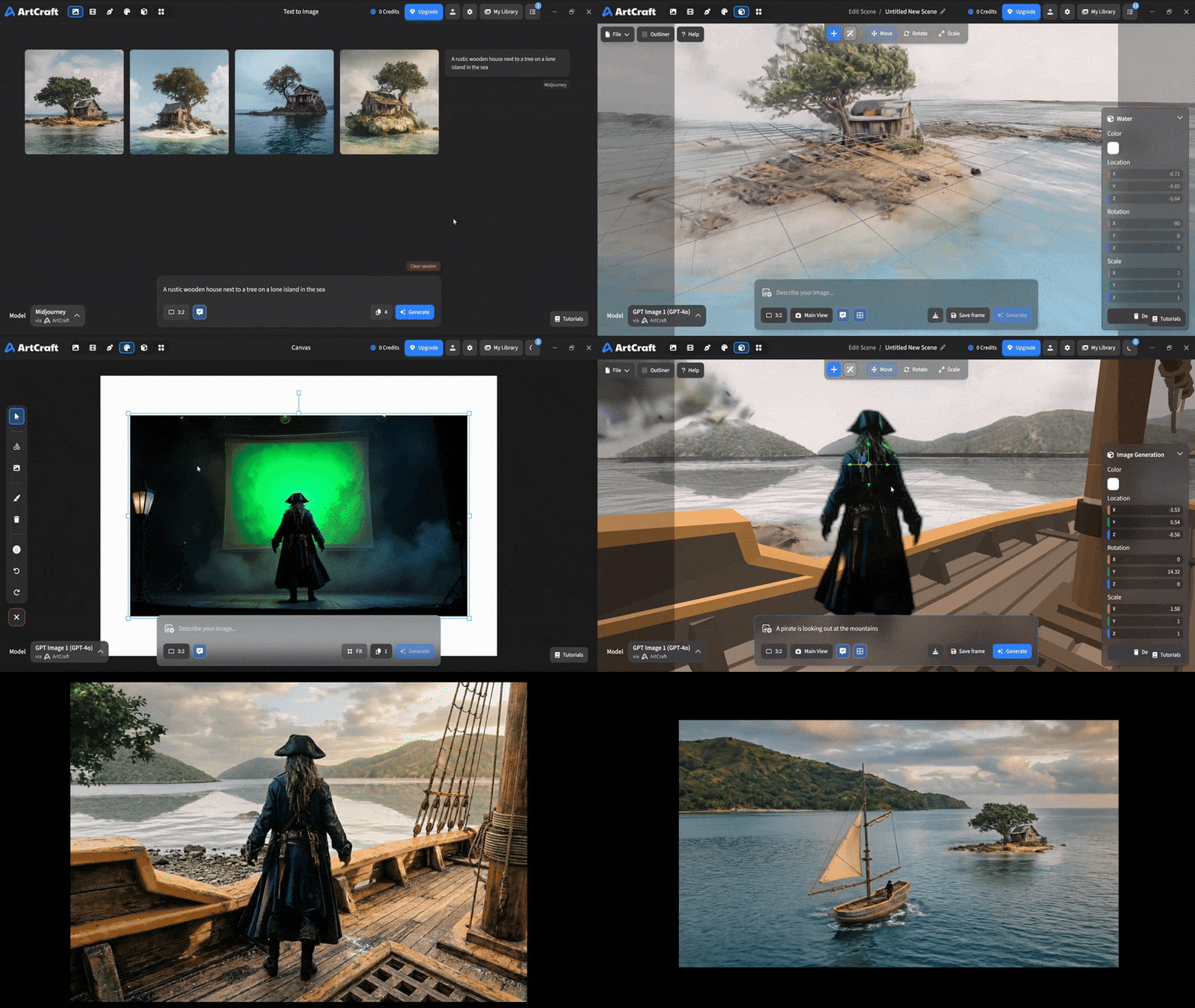 You can use image cutouts, worlds, and simple 3D meshes all together to precisely and intentionally lay out your scenes. |
| Scene Blocking | (preview coming soon) |
| Canvas Editing | (preview coming soon) |
| Scene Relighting | (preview coming soon) |
Note: all of the above videos were generated for free with Grok Video; the cost to build this README was negligible.
Quick and Easy Prompting
We haven't abandoned text-to-asset generation for quick prototyping and ideation. We support every popular workflow in a first class fashion.
| Feature | Demo + Explanation |
|---|---|
| Text to Image | |
| Image Editing | |
| Image Editing | |
| Image to Video | |
| Image Inpainting | (preview coming soon) |
| Image Ingredients | (preview coming soon) |
Models and Providers Supported within Artcraft
| Provider | Features |
|---|---|
| Artcraft | Nano Banana, Nano Banana Pro, GPT-Image-1 / 1.5, Seedance 1.0 Lite / 1.5 Pro / 2.0, Seedream 4 / 4.5, Flux 1.1 / Kontext, Veo 2 / 3 / 3.1, Kling 1.6 / 2.1 / 2.5 / 2.6, Sora 2 / Pro, Hunyuan 3d 2 / 3 |
| Grok | Grok Imagine, Grok Video |
| Midjourney | Image Gen (all versions) |
| Sora | Sora 1, Sora 2, GPT-Image-1 |
| WorldLabs | Marble (Gaussian Splat World Generation) |
We're going to be adding the following providers soon: Kling (via Kling website accounts), Google (via API keys), Runway (via website account), Luma (via website account).
We're potentially interested in adding other aggregators for those who already have subscriptions and credits at those providers, for example: OpenArt, FreePik, etc.
Downloads
- Visit our website for the stable Windows and MacOS releases
- Or you can grab a more recent Windows and MacOS build directly
- Linux requires building from source for now