 Tanish Manku
537409eb3e
Tanish Manku
537409eb3e
Adds script/bootstrap/ — idempotent Ubuntu 22.04+/WSL2/CI automation that takes
a fresh clone to a running local stack with zero production traffic:

- bootstrap_dev_stack.sh: apt packages, MySQL 8 + Redis up, storyteller DB/user,
  281 diesel migrations, idempotent role/badge seeds, generated dummy
  development-secrets.env (19 required-at-boot vars no checked-in config
  supplies), SQLX_OFFLINE backend build, frontend npm install
- run_backend_dev.sh / seed_demo_user.sh: run the API from the repo root and
  create+verify a demo login through the real POST /v1/create_account path
- dev_stack_doctor.sh: PASS/WARN/FAIL diagnosis of every prerequisite

_docs/dev_setup_local_stack.md records the requirements the scripts encode and
corrects stale claims (server reads MYSQL_URL, not DATABASE_URL; repo-root .env
is not loaded by the server; config precedence is first-value-wins;
SQLX_OFFLINE is compile-time only).

.gitattributes now forces LF for *.sh/*.env so Windows clones run under WSL2.
The IDE for artists.




ArtCraft
ArtCraft is the IDE for interactive AI image and video creation. We turn prompting into crafting, so your ideas become a form of tangible expression and computing. This is Adobe Photoshop for everyone, and we're giving away the source code!
Show, Don't Tell: Advanced Crafting Features
Text-to-image is great, but artists need control. It's important to know what your image will look like before you generate it, and it's vitally important to achieve consistency and repeatability.
| Feature | Demo + Explanation |
|---|---|
| Image to Location | |
| 3D Image Compositing | |
| 2D Image Compositing | |
| Image to 3D Mesh | |
| Character Posing |  You can dynamically pose your characters to achieve the precise character, scene, and camera blocking before calling "action". You can dynamically pose your characters to achieve the precise character, scene, and camera blocking before calling "action". |
| Scene Blocking w/ Kit Bashing | |
| Character Identity Transfer | |
| Background Removal | |
| Mixed Asset Crafting | 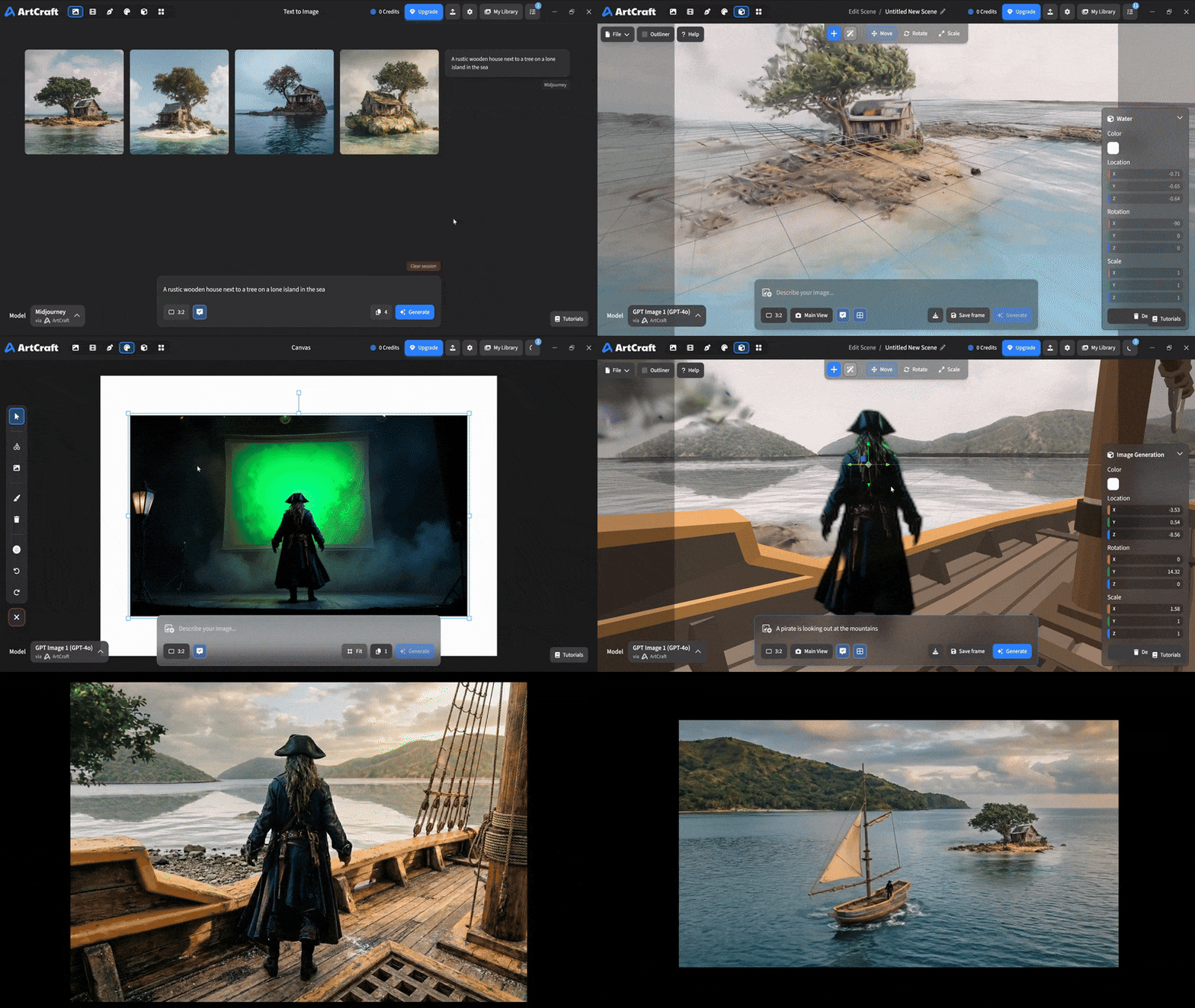 You can use image cutouts, worlds, and simple 3D meshes all together to precisely and intentionally lay out your scenes. You can use image cutouts, worlds, and simple 3D meshes all together to precisely and intentionally lay out your scenes. |
| Scene Blocking | (preview coming soon) |
| Canvas Editing | (preview coming soon) |
| Scene Relighting | (preview coming soon) |
Note: all of the above videos were generated for free with Grok Video; the cost to build this README was negligible.
Quick and Easy Prompting
We haven't abandoned text-to-asset generation for quick prototyping and ideation. We support every popular workflow in a first class fashion.
| Feature | Demo + Explanation |
|---|---|
| Text to Image | |
| Image Editing | |
| Image Editing | |
| Image to Video | |
| Image Inpainting | (preview coming soon) |
| Image Ingredients | (preview coming soon) |
Models and Providers Supported within Artcraft
| Provider | Features |
|---|---|
| Artcraft | Nano Banana, Nano Banana Pro, GPT-Image-1 / 1.5, Seedance 1.0 Lite / 1.5 Pro / 2.0, Seedream 4 / 4.5, Flux 1.1 / Kontext, Veo 2 / 3 / 3.1, Kling 1.6 / 2.1 / 2.5 / 2.6, Sora 2 / Pro, Hunyuan 3d 2 / 3 |
| Grok | Grok Imagine, Grok Video |
| Midjourney | Image Gen (all versions) |
| Sora | Sora 1, Sora 2, GPT-Image-1 |
| WorldLabs | Marble (Gaussian Splat World Generation) |
We're going to be adding the following providers soon: Kling (via Kling website accounts), Google (via API keys), Runway (via website account), Luma (via website account).
We're potentially interested in adding other aggregators for those who already have subscriptions and credits at those providers, for example: OpenArt, FreePik, etc.
Downloads
- Visit our website for the stable Windows and MacOS releases
- Or you can grab a more recent Windows and MacOS build directly
- Linux requires building from source for now