 Tanish Manku
273c8e985c
Motion foundation + expressive entrance/interaction polish for the webapp,
following a "balanced" direction (restrained chrome, expressive canvas).

Foundation
- Motion tokens: --ease-*/--dur-* CSS vars (styles.css) mirrored as JS
  constants/presets in lib/motion.ts; prefers-reduced-motion respected.
- Shared Reveal/RevealGroup primitive (components/motion) — fade-up + stagger.

Chrome & navigation
- Global route fade (components/motion/page-transition) keyed by section.
- Sidebar active-indicator slide via framer layoutId + icon hover.

Pages
- Home: hero/eyebrow reveal, staggered launcher cards, spring lift/press
  hover, double-bezel cards, nested arrow chip.
- Auth: AuthHeader staggers in (login+signup); form blocks cascade after.
- Pricing: wire the orphaned data-reveal hero through the real Reveal.
- Library: sliding active indicator on tab/filter switchers (layoutId),
  shimmer-sweep loading skeleton.

Pagescene entrance animations (user-drop only)
- EntranceAnimator: meshes get a transform-based pop/rise/fall drop with a
  rubbery squash overshoot; splats get a per-gaussian radial settle (Spark
  dyno) with center-out fade + height drop. Dev-only speed slider.

Gallery + asset drag-under UX
- On drag-start the gallery/asset modal becomes pointer-transparent so the
  drag passes under onto the canvas; steps back to translucent (reopen on)
  or eases fully out (reopen off), all interpolated. Shared DragGhost
  (lift/tilt/follow) feeds both DnD systems. Media fades to placeholders so
  thumbnails don't block the canvas. Asset modal always reopens fully visible.

PageDraw: entrance fade on add + workspace vignette.

Dev-only (local testing): drop setDevelopment() API host pin; add /__cdn
proxy + maybeProxyCdnUrl so CDN splat/GLB assets dodge CORS.
The IDE for artists.


ArtCraft
ArtCraft is the IDE for interactive AI image and video creation. We turn prompting into crafting, so your ideas become a form of tangible expression and computing. This is Adobe Photoshop for everyone, and we're giving away the source code!
Show, Don't Tell: Advanced Crafting Features
Text-to-image is great, but artists need control. It's important to know what your image will look like before you generate it, and it's vitally important to achieve consistency and repeatability.
| Feature | Demo + Explanation |
|---|---|
| Image to Location | |
| 3D Image Compositing | |
| 2D Image Compositing | |
| Image to 3D Mesh | |
| Character Posing | |
| Scene Blocking w/ Kit Bashing | |
| Character Identity Transfer | |
| Background Removal | |
| Mixed Asset Crafting | 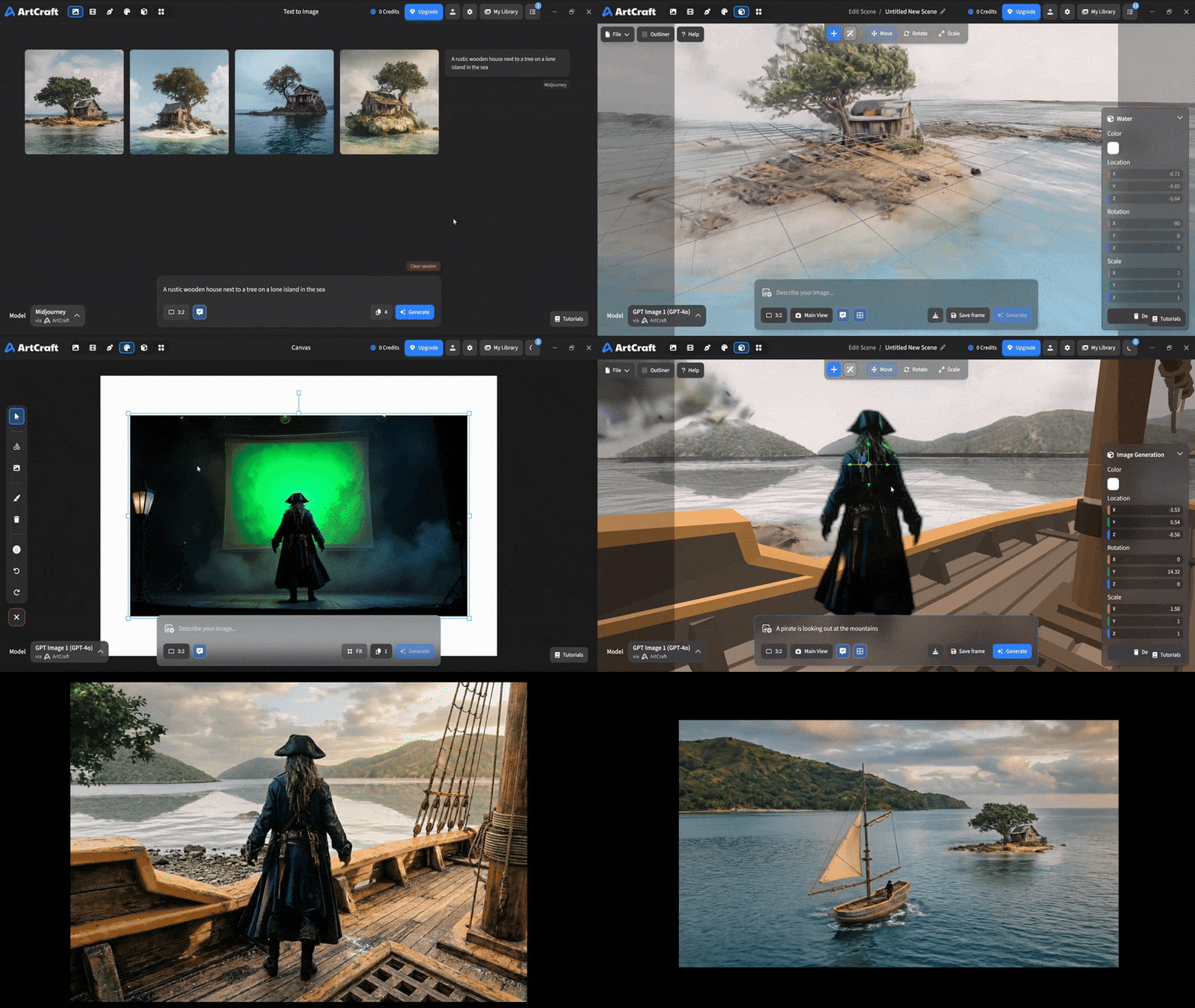 You can use image cutouts, worlds, and simple 3D meshes all together to precisely and intentionally lay out your scenes. |
| Scene Blocking | (preview coming soon) |
| Canvas Editing | (preview coming soon) |
| Scene Relighting | (preview coming soon) |
Note: all of the above videos were generated for free with Grok Video; the cost to build this README was negligible.
Quick and Easy Prompting
We haven't abandoned text-to-asset generation for quick prototyping and ideation. We support every popular workflow in a first class fashion.
| Feature | Demo + Explanation |
|---|---|
| Text to Image | |
| Image Editing | |
| Image Editing | |
| Image to Video | |
| Image Inpainting | (preview coming soon) |
| Image Ingredients | (preview coming soon) |
Models and Providers Supported within Artcraft
| Provider | Features |
|---|---|
| Artcraft | Nano Banana, Nano Banana Pro, GPT-Image-1 / 1.5, Seedance 1.0 Lite / 1.5 Pro / 2.0, Seedream 4 / 4.5, Flux 1.1 / Kontext, Veo 2 / 3 / 3.1, Kling 1.6 / 2.1 / 2.5 / 2.6, Sora 2 / Pro, Hunyuan 3d 2 / 3 |
| Grok | Grok Imagine, Grok Video |
| Midjourney | Image Gen (all versions) |
| Sora | Sora 1, Sora 2, GPT-Image-1 |
| WorldLabs | Marble (Gaussian Splat World Generation) |
We're going to be adding the following providers soon: Kling (via Kling website accounts), Google (via API keys), Runway (via website account), Luma (via website account).
We're potentially interested in adding other aggregators for those who already have subscriptions and credits at those providers, for example: OpenArt, FreePik, etc.
Downloads
- Visit our website for the stable Windows and MacOS releases
- Or you can grab a more recent Windows and MacOS build directly
- Linux requires building from source for now