 Tanish Manku
0ec3d93437
Tanish Manku
0ec3d93437
Whole-pass audit of the scaffold found three gaps and closes them:

- Guardrail tests only ever passed. The wrangler.toml mapping and the
  MCP_ENVIRONMENT isolation checks are now pure functions
  (test/helpers/) tested against mutated input: preview→production,
  production→fake, local→production, mislabelled env, shared KV id,
  extra "staging" env, changed entry point, a file reading the binding,
  a file branching on the environment name.
- src/index.ts's misconfiguration path had no test. Added: 500 with the
  exact mismatch message, memoized failure across requests, missing
  bindings reported, sound bindings still serve.
- fake-upstream had an [env.preview] block it did not need (one deploy
  target) which made wrangler warn; now top-level only, script `deploy`.

Also verified out-of-band and recorded in CLAUDE.md as rules 4–6 of the
working method: `pnpm install --frozen-lockfile`, `wrangler deploy
--dry-run` for both Workers (production bundle contains no fake code),
the eslint boundary rejects a server→fake import, and both Workers boot
under `wrangler dev` and answer over HTTP.

pnpm check: typecheck, eslint, prettier, 37 tests passing.

Claude-Session: https://claude.ai/code/session_01H3gfN2NCx3hBXSrZXYHUQ3
The IDE for artists.




ArtCraft
ArtCraft is the IDE for interactive AI image and video creation. We turn prompting into crafting, so your ideas become a form of tangible expression and computing. This is Adobe Photoshop for everyone, and we're giving away the source code!
Show, Don't Tell: Advanced Crafting Features
Text-to-image is great, but artists need control. It's important to know what your image will look like before you generate it, and it's vitally important to achieve consistency and repeatability.
| Feature | Demo + Explanation |
|---|---|
| Image to Location | |
| 3D Image Compositing | |
| 2D Image Compositing | |
| Image to 3D Mesh | |
| Character Posing |  You can dynamically pose your characters to achieve the precise character, scene, and camera blocking before calling "action". You can dynamically pose your characters to achieve the precise character, scene, and camera blocking before calling "action". |
| Scene Blocking w/ Kit Bashing | |
| Character Identity Transfer | |
| Background Removal | |
| Mixed Asset Crafting | 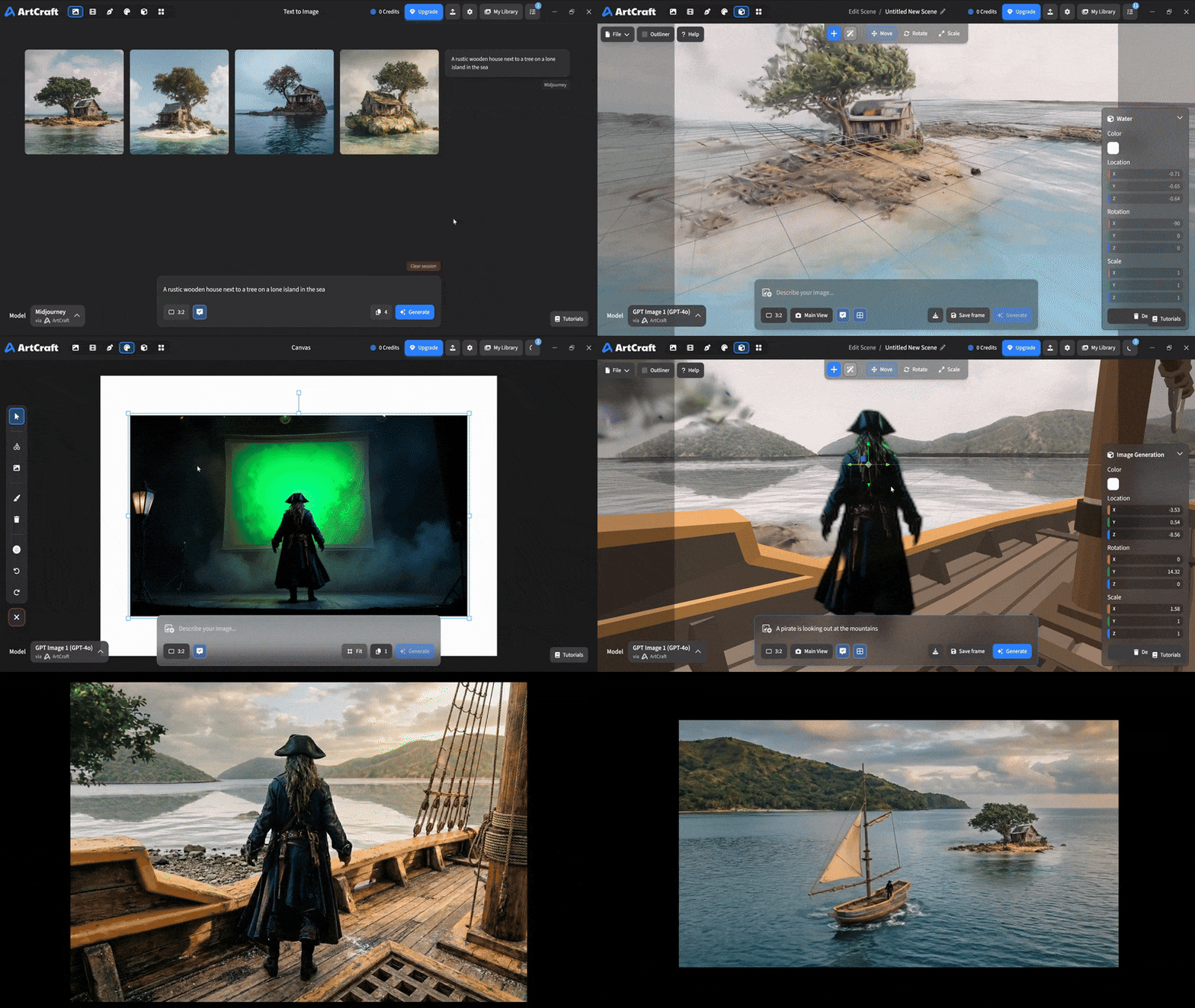 You can use image cutouts, worlds, and simple 3D meshes all together to precisely and intentionally lay out your scenes. You can use image cutouts, worlds, and simple 3D meshes all together to precisely and intentionally lay out your scenes. |
| Scene Blocking | (preview coming soon) |
| Canvas Editing | (preview coming soon) |
| Scene Relighting | (preview coming soon) |
Note: all of the above videos were generated for free with Grok Video; the cost to build this README was negligible.
Quick and Easy Prompting
We haven't abandoned text-to-asset generation for quick prototyping and ideation. We support every popular workflow in a first class fashion.
| Feature | Demo + Explanation |
|---|---|
| Text to Image | |
| Image Editing | |
| Image Editing | |
| Image to Video | |
| Image Inpainting | (preview coming soon) |
| Image Ingredients | (preview coming soon) |
Models and Providers Supported within Artcraft
| Provider | Features |
|---|---|
| Artcraft | Nano Banana, Nano Banana Pro, GPT-Image-1 / 1.5, Seedance 1.0 Lite / 1.5 Pro / 2.0, Seedream 4 / 4.5, Flux 1.1 / Kontext, Veo 2 / 3 / 3.1, Kling 1.6 / 2.1 / 2.5 / 2.6, Sora 2 / Pro, Hunyuan 3d 2 / 3 |
| Grok | Grok Imagine, Grok Video |
| Midjourney | Image Gen (all versions) |
| Sora | Sora 1, Sora 2, GPT-Image-1 |
| WorldLabs | Marble (Gaussian Splat World Generation) |
We're going to be adding the following providers soon: Kling (via Kling website accounts), Google (via API keys), Runway (via website account), Luma (via website account).
We're potentially interested in adding other aggregators for those who already have subscriptions and credits at those providers, for example: OpenArt, FreePik, etc.
Downloads
- Visit our website for the stable Windows and MacOS releases
- Or you can grab a more recent Windows and MacOS build directly
- Linux requires building from source for now