 Tanish Manku
0798f89312
src/mcp/handler.ts replaces the 501 stub. The provider's decrypted grant
props become a Principal (a grant this build cannot read → 403, never
guessed at); a read-use upstream client is bound to its credential; a
fresh McpServer and the SDK's web-standard Streamable HTTP transport
(stateless, JSON responses) serve the request; and when a tool reports
the upstream no longer accepts the credential, the grant is revoked via
unwrapToken + revokeGrant after the response, so the client's next
request meets a 401 and re-authorizes.

Only /mcp is protected: access tokens are audience-bound to it, so a
legacy /sse route could never be reached with one; the unprotected app
now answers /sse with a 405 pointing at /mcp.

Tests (6, the SDK's real Client + StreamableHTTPClientTransport routed
into worker.fetch, fake upstream in-process): initialize → list →
get_credit_balance with the seeded balances; empty list for a grant
without read:account; 401 unauthenticated; 403 for a grant with
unreadable props; revocation after the fake session is logged out (tool
error, then 401); /sse pointer. Earlier suites that asserted the stub
now assert a JSON-RPC initialize succeeds, with grant props recorded
the way consent records them.

pnpm check: typecheck, eslint, prettier, 181 tests passing.

Claude-Session: https://claude.ai/code/session_01H3gfN2NCx3hBXSrZXYHUQ3
The IDE for artists.


ArtCraft
ArtCraft is the IDE for interactive AI image and video creation. We turn prompting into crafting, so your ideas become a form of tangible expression and computing. This is Adobe Photoshop for everyone, and we're giving away the source code!
Show, Don't Tell: Advanced Crafting Features
Text-to-image is great, but artists need control. It's important to know what your image will look like before you generate it, and it's vitally important to achieve consistency and repeatability.
| Feature | Demo + Explanation |
|---|---|
| Image to Location | |
| 3D Image Compositing | |
| 2D Image Compositing | |
| Image to 3D Mesh | |
| Character Posing |  You can dynamically pose your characters to achieve the precise character, scene, and camera blocking before calling "action". |
| Scene Blocking w/ Kit Bashing | |
| Character Identity Transfer | |
| Background Removal | |
| Mixed Asset Crafting | 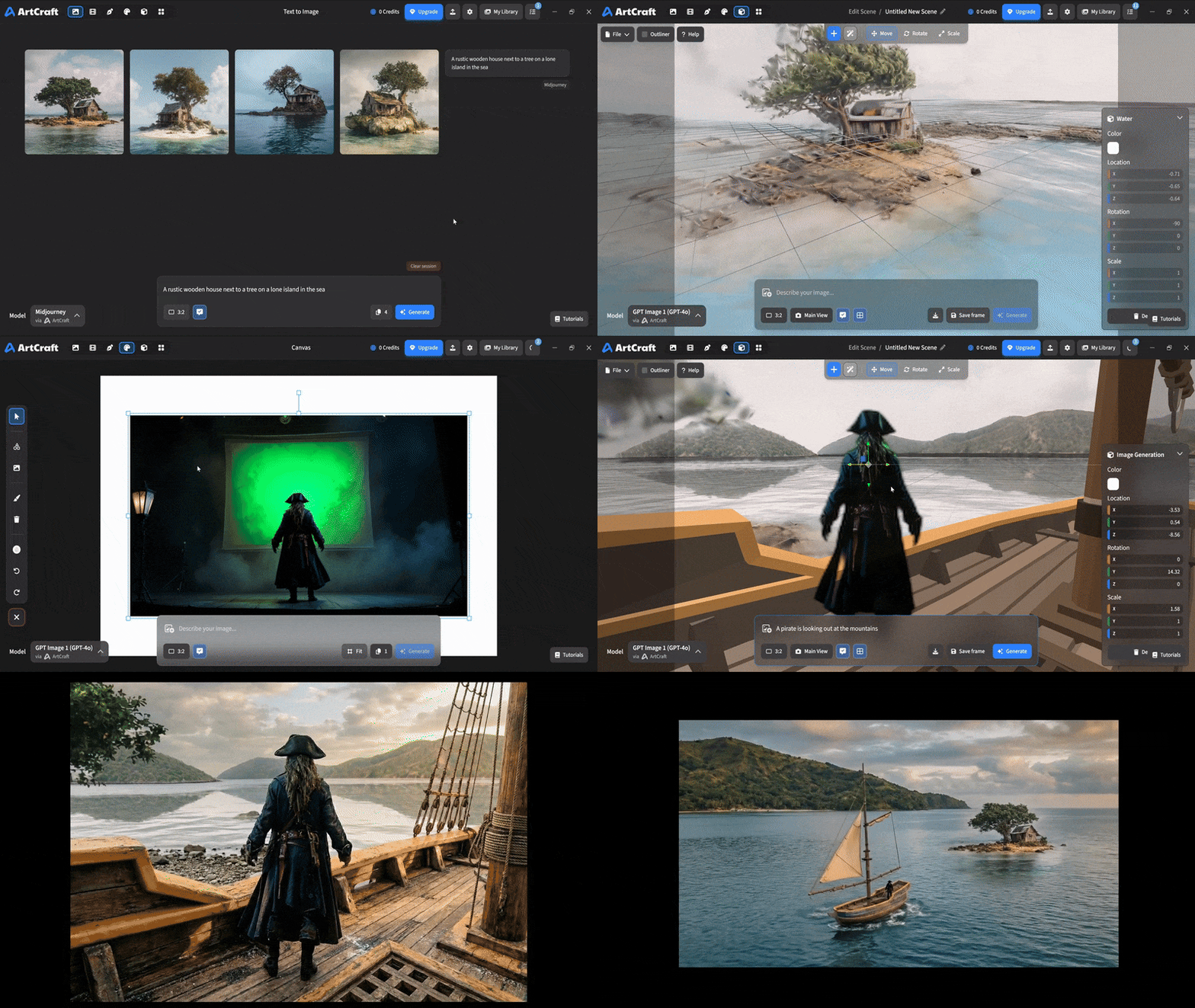 You can use image cutouts, worlds, and simple 3D meshes all together to precisely and intentionally lay out your scenes. |
| Scene Blocking | (preview coming soon) |
| Canvas Editing | (preview coming soon) |
| Scene Relighting | (preview coming soon) |
Note: all of the above videos were generated for free with Grok Video; the cost to build this README was negligible.
Quick and Easy Prompting
We haven't abandoned text-to-asset generation for quick prototyping and ideation. We support every popular workflow in a first class fashion.
| Feature | Demo + Explanation |
|---|---|
| Text to Image | |
| Image Editing | |
| Image Editing | |
| Image to Video | |
| Image Inpainting | (preview coming soon) |
| Image Ingredients | (preview coming soon) |
Models and Providers Supported within Artcraft
| Provider | Features |
|---|---|
| Artcraft | Nano Banana, Nano Banana Pro, GPT-Image-1 / 1.5, Seedance 1.0 Lite / 1.5 Pro / 2.0, Seedream 4 / 4.5, Flux 1.1 / Kontext, Veo 2 / 3 / 3.1, Kling 1.6 / 2.1 / 2.5 / 2.6, Sora 2 / Pro, Hunyuan 3d 2 / 3 |
| Grok | Grok Imagine, Grok Video |
| Midjourney | Image Gen (all versions) |
| Sora | Sora 1, Sora 2, GPT-Image-1 |
| WorldLabs | Marble (Gaussian Splat World Generation) |
We're going to be adding the following providers soon: Kling (via Kling website accounts), Google (via API keys), Runway (via website account), Luma (via website account).
We're potentially interested in adding other aggregators for those who already have subscriptions and credits at those providers, for example: OpenArt, FreePik, etc.
Downloads
- Visit our website for the stable Windows and MacOS releases
- Or you can grab a more recent Windows and MacOS build directly
- Linux requires building from source for now